
GLM-5.2 vs GPT-4o: Which Model Fits Your Workflow?
Independent research — not an official Z.ai publication.Identity and provider disclosure

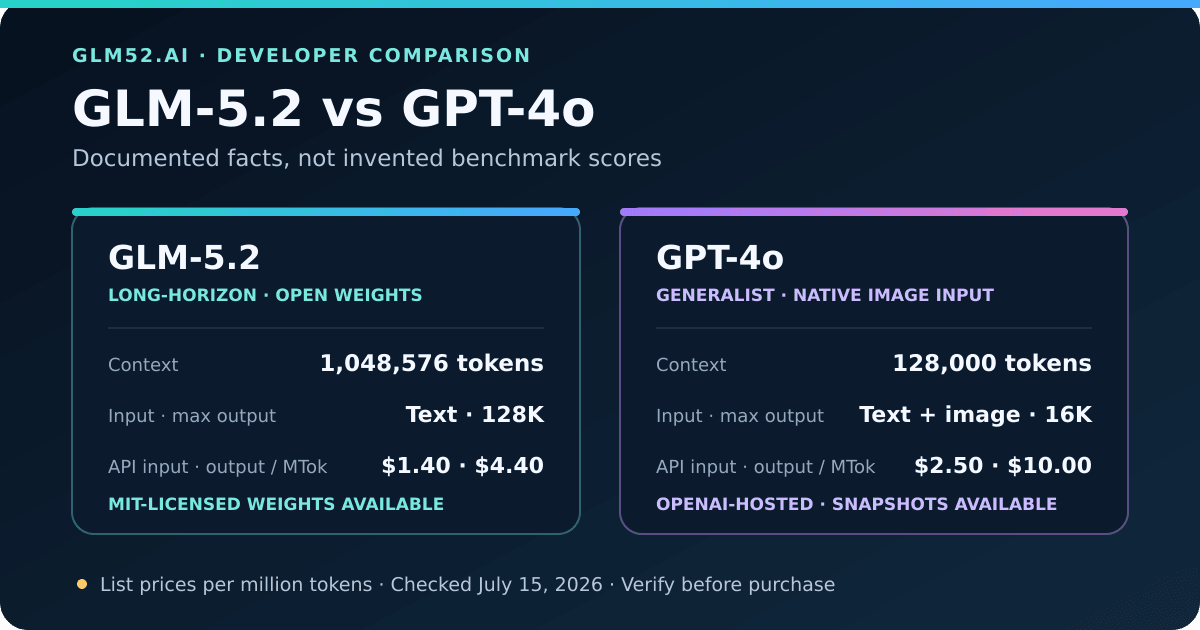
Published specifications and list prices—not invented benchmark scores. Prices were checked on July 15, 2026.
This is not a clean “new flagship versus new flagship” contest. GLM-5.2 is Z.ai’s June 2026 model for long-horizon engineering. GPT-4o is an older but still supported OpenAI API model and a common compatibility baseline; OpenAI’s current model catalog recommends newer GPT-5-series models for frontier coding and reasoning. That age difference matters when interpreting any headline that calls this a definitive intelligence showdown.
The useful question is narrower: for a developer choosing an API or coding-agent workflow today, which documented differences change the decision? This guide answers that question with official specifications, transparent cost arithmetic, and explicit limits. It does not turn vendor benchmark charts into a made-up head-to-head result.
If your decision centers on current long-horizon coding, equal 1M context windows, or cost per accepted agent task, read the separate GLM-5.2 vs Claude Opus 4.8 comparison. Keeping that intent separate avoids treating the older GPT-4o baseline as OpenAI’s or the wider market’s current frontier.
In this guide
Section titled “In this guide”- Documented differences at a glance
- What the context-window gap means
- Coding and agent workflows
- Multimodal input is a real dividing line
- API integration and migration risk
- API pricing and an honest cost example
- Open weights and deployment control
- Which model should you choose?
- Z.ai Coding Plan and invite benefit
- What this comparison does not claim
Documented differences at a glance
Section titled “Documented differences at a glance”| Decision factor | GLM-5.2 | GPT-4o | Why it matters |
|---|---|---|---|
| Publisher positioning | Long-horizon, agentic engineering | Fast, flexible general-purpose model | They are optimized and marketed for different jobs |
| Context window | 1,048,576 tokens | 128,000 tokens | GLM-5.2 can accept about 8.2× as much context per request |
| Maximum output | 131,072 tokens | 16,384 tokens | Long plans, patches, or reports have a much higher documented ceiling on GLM-5.2 |
| Input modalities | Text | Text and images | GPT-4o can inspect screenshots or diagrams directly |
| Output modality | Text | Text | Neither model page promises native image generation from this endpoint |
| Function calling | Supported | Supported | Both can drive tool loops, but schemas and behavior still need validation |
| Structured output | Supported | Supported | Both can target machine-readable JSON workflows |
| Context caching | Supported | Supported and separately priced | Repeated prompt prefixes can cost less, subject to each provider’s rules |
| Reasoning control | thinking plus effort levels |
No reasoning-effort control listed for GPT-4o | GLM exposes an explicit speed-versus-effort choice |
| Model access | Hosted API and MIT-licensed open weights | OpenAI-hosted API | GLM can be self-hosted; GPT-4o cannot be downloaded as weights |
| Version control | Weight revisions can be pinned when self-hosted | Published API snapshots are available | Reproducibility takes a different form on each platform |
| Fine-tuning | Not listed on the GLM-5.2 model guide | Supported | GPT-4o has the clearer first-party path for managed fine-tuning |
The table describes capability surfaces, not output quality. A larger context window does not prove that every answer is better; function calling support does not prove that every tool call is valid; and a lower price per token does not prove a lower cost per completed task.
What the context-window gap means
Section titled “What the context-window gap means”Z.ai documents a 1M-token context and 128K maximum output for GLM-5.2. OpenAI documents a 128K context and 16,384-token maximum output for GPT-4o. Those are hard product differences, but their value depends on the workload.
Where GLM-5.2’s 1M context can matter
Section titled “Where GLM-5.2’s 1M context can matter”- auditing a large repository with source, tests, configuration, and documentation together;
- maintaining constraints across a long coding-agent trajectory;
- comparing many documents without building a separate retrieval step first;
- carrying a large tool transcript through multi-stage research or migration work;
- producing long implementation plans, reports, or code changes without a 16K output ceiling.
Where it may not matter
Section titled “Where it may not matter”If your typical request contains a few files and produces a short answer, 128K can already be ample. Sending an entire repository on every turn can increase prefill time and cost, surface irrelevant context, and make instructions harder to prioritize. A larger window is capacity, not a command to fill it.
At the extreme end, context also becomes an infrastructure question. Z.ai’s own release notes explain that one-million-token serving shifts pressure toward KV-cache capacity, long-context kernels, and CPU overhead. Our GLM-5.2 local hardware guide shows why the maximum window is especially demanding when self-hosting.
The better design rule is: send the smallest context that preserves the necessary contracts and evidence, then expand when retrieval or summarization starts losing important information.
Coding and agent workflows
Section titled “Coding and agent workflows”GLM-5.2 was trained and released around long-horizon coding-agent work. Its first-party guide emphasizes repository-scale understanding, cross-file refactoring, engineering-constraint adherence, tool use, and long-running execution. It also exposes thinking and reasoning_effort controls, allowing a caller to spend more reasoning effort on difficult tasks and less on routine ones.
GPT-4o is a broader generalist. It supports streaming, function calling, Structured Outputs, fine-tuning, and versioned snapshots. That combination remains useful for mature applications that already depend on OpenAI request schemas, model snapshots, evaluation tooling, or vision input.
What the documentation cannot settle is which model will repair your code more reliably. Coding success depends on the agent shell, repository instructions, available tools, test feedback, timeouts, provider revision, and the exact task. Z.ai’s published benchmark results are evidence about its release positioning; they are not a controlled GLM-5.2-versus-GPT-4o experiment run by this site.
A practical split is:
- GLM-5.2: start here for large text-only repositories, long autonomous task chains, or a cost-sensitive coding agent.
- GPT-4o: start here for image-assisted debugging, an existing OpenAI production stack, or a managed fine-tuning requirement.
- Either: for short code generation, JSON extraction, and ordinary tool calls, the documented feature lists overlap enough that task-specific acceptance tests matter more than marketing categories.
Multimodal input is a real dividing line
Section titled “Multimodal input is a real dividing line”GPT-4o accepts text and image inputs. That makes it the direct choice when the request itself contains a UI screenshot, architecture diagram, chart, photographed error message, or other visual evidence.
GLM-5.2’s official model page lists text input and text output. The Z.ai Coding Plan includes a separate Vision MCP capability, but that is an auxiliary service powered by a vision model—not evidence that the GLM-5.2 endpoint natively accepts images. This distinction is easy to miss when comparing a model with a subscription bundle.
If your agent can extract text or structured data from the image through another tool before calling the language model, GLM-5.2 can still participate in the workflow. If you want one model call to reason over the pixels directly, GPT-4o has the documented advantage in this comparison.
API integration and migration risk
Section titled “API integration and migration risk”Both models can be called through familiar chat-completion patterns. Z.ai publishes an OpenAI SDK example using:
base_url: https://api.z.ai/api/paas/v4/model: glm-5.2The OpenAI endpoint uses its default API base URL with:
model: gpt-4oThat similarity reduces initial integration work, but it does not make the providers interchangeable. Before switching production traffic, verify:
- Request fields: GLM-specific
thinkingandreasoning_effortcontrols are not GPT-4o parameters. - Structured output: test the exact JSON Schema features and refusal/error cases you depend on.
- Tool calls: validate argument serialization, parallel calls, streaming deltas, and retry behavior.
- Token accounting: compare provider-reported input, cached input, reasoning, and output usage.
- Model identity: pin a GPT-4o snapshot or a self-hosted GLM revision when reproducibility matters.
- Operational limits: rate limits, context allocation, regional latency, and provider incidents are separate from model quality.
Do not silently send an OpenAI-tuned temperature, prompt, or retry policy to GLM-5.2 and call the result fair. Provider-compatible wire formats do not guarantee identical sampling behavior.
API pricing and an honest cost example
Section titled “API pricing and an honest cost example”The following are first-party list prices per one million text tokens, checked July 15, 2026. They can change, so verify both live pricing pages before budgeting.
| Token category | GLM-5.2 | GPT-4o |
|---|---|---|
| Input | $1.40 | $2.50 |
| Cached input | $0.26 | $1.25 |
| Output | $4.40 | $10.00 |
At those rates, a hypothetical successful task using 100,000 uncached input tokens and 10,000 output tokens costs:
GLM-5.2 = 0.10 × $1.40 + 0.01 × $4.40 = $0.184GPT-4o = 0.10 × $2.50 + 0.01 × $10.00 = $0.350This is transparent arithmetic, not a measured average task. It excludes retries, failed tool loops, cache eligibility, and any separate product or infrastructure fees. In this exact example, GLM-5.2’s listed token cost is lower. If it needs more retries or human repair on your workload, the advantage can shrink or disappear.
The metric worth optimizing is:
cost per accepted result = total model and tool spend ÷ outputs that pass your acceptance checksThat denominator prevents a cheap but unusable response from looking efficient.
Do not confuse the Coding Plan with pay-as-you-go API pricing
Section titled “Do not confuse the Coding Plan with pay-as-you-go API pricing”Z.ai offers two different purchase paths:
- The general API uses per-token billing and the general API endpoint for applications you build.
- The GLM Coding Plan is a subscription with usage allowances, a dedicated coding endpoint, and a defined list of supported coding tools.
The $18/month starting price and the invitation discount below apply to the Coding Plan, not to the general per-token API bill. Choose the Plan for supported IDE/agent usage; choose the general API when GLM-5.2 is a component inside your own application.
Open weights and deployment control
Section titled “Open weights and deployment control”GLM-5.2’s official weights are available under the MIT license. That enables organizations to pin a checkpoint, inspect configuration, choose a serving stack, and keep inference inside infrastructure they control.
The trade-off is scale: the official BF16 checkpoint is about 1.5 TB and even aggressive community quantizations need hundreds of gigabytes. “Open weights” describes access and control, not easy laptop deployment.
GPT-4o is an OpenAI-hosted model. You do not manage weight files or serving hardware, and the documented snapshots provide a way to hold API behavior more stable. That is less infrastructure work, but it does not provide the deployment independence of an open-weight checkpoint.
Choose based on the control you actually need. Self-hosting only makes economic sense after including hardware utilization, engineering time, monitoring, upgrades, and failure recovery—not just token prices.
Which model should you choose?
Section titled “Which model should you choose?”| Your primary requirement | Better starting point | Reason |
|---|---|---|
| Repository or transcript may exceed 128K tokens | GLM-5.2 | 1M documented context and 128K output ceiling |
| Screenshots or diagrams must go directly into the model | GPT-4o | Native image input is documented |
| Lowest listed API token rates in this comparison | GLM-5.2 | Lower input, cached-input, and output prices on the checked date |
| Downloadable weights or infrastructure control | GLM-5.2 | MIT-licensed open weights |
| Existing OpenAI app with snapshots or fine-tuning | GPT-4o | Lower migration risk and documented first-party support |
| Long-running work inside Claude Code, Cline, or another supported coding tool | GLM Coding Plan | Subscription is designed for supported coding-agent tools |
| Frontier OpenAI coding for a brand-new project | Compare GLM-5.2 with a current GPT-5 model too | GPT-4o is no longer OpenAI’s current frontier baseline |
| High-stakes correctness | Neither by specification alone | Build acceptance checks and review failures before committing |
If your workflow spans several rows, route by task instead of forcing one winner. A vision-capable model can interpret a screenshot, while a long-context model handles repository-wide implementation. Model routing adds complexity, but it can be more rational than paying one model to do every job.
Try GLM-5.2 through the Z.ai Coding Plan
Section titled “Try GLM-5.2 through the Z.ai Coding Plan”The external Z.ai Coding Plan starts at $18/month on the monthly Lite plan and works with 20+ coding tools, including Claude Code and Cline. Z.ai—not GLM52.ai—operates the account, subscription, model access, billing, and support. The plan is a simple way to try GLM-5.2 inside an existing coding-agent workflow without operating the model yourself.
What this comparison does not claim
Section titled “What this comparison does not claim”To keep the conclusion rigorous, this page deliberately does not publish:
- a coding pass-rate winner without the same tasks, tools, prompts, and graders;
- a latency winner without the same region, concurrency, provider, and request size;
- a hallucination percentage without a defined dataset and verification method;
- a “1M is always better” claim without accounting for relevance, prefill time, and cost;
- a subscription-to-API cost comparison that treats quotas and tokens as interchangeable;
- blank benchmark cells that ask the reader to finish the article’s evidence.
The durable conclusions are the documented ones: GLM-5.2 offers far more text context, longer output, lower current token rates, explicit reasoning controls, and open weights. GPT-4o offers native image input, mature OpenAI API compatibility, snapshots, and managed fine-tuning. Everything beyond those facts should be demonstrated on the workload that will pay the bill.
Sources and update policy
Section titled “Sources and update policy”- Z.ai GLM-5.2 model guide
- Z.ai GLM-5.2 release article
- Official GLM-5.2 weights and MIT license
- Z.ai API pricing
- Z.ai Coding Plan overview
- Z.ai invitation campaign rules
- OpenAI GPT-4o model documentation
- OpenAI current model catalog
Publisher documentation is the source for specifications, prices, supported features, and campaign terms. Vendor benchmark results are treated as publisher claims, not independent head-to-head measurements. Pricing and promotional language are dated because both can change.
Affiliate Disclosure
The Z.ai button is a referral link. Eligible invited users may receive the first-order benefit described above, and GLM52.ai may receive promotional credits after qualifying purchases. This commercial relationship does not change the documented comparison or the cases where GPT-4o is the better fit.