
How to Fine-Tune GLM-5.2: A Practical, Evidence-Based Guide
Independent research — not an official Z.ai publication.Identity and provider disclosure

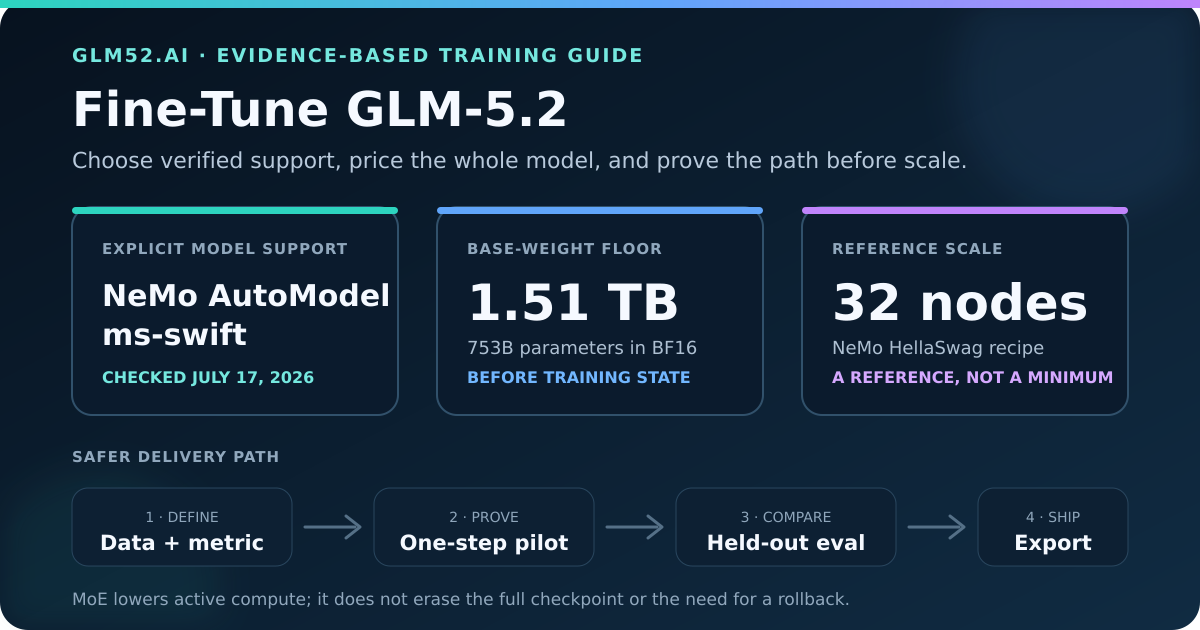
Tool support and primary documentation were checked July 17, 2026. “Explicit support” below means the tool names GLM-5.2 in its current model table or ships a model-specific recipe. It does not mean GLM52.ai ran the published multi-node jobs.
If you search for a GLM-5.2 fine-tuning guide, you will find familiar names: LoRA, PEFT, DeepSpeed, NeMo, ms-swift, and LLaMA-Factory. Those names do not carry the same level of proof. A framework may load a checkpoint for inference but fail during backward propagation. It may train dense attention but mishandle sparse experts. It may save an adapter that your serving engine cannot load.
This guide separates verified model support from general training capability. It also explains the memory floor, the cases where fine-tuning makes sense, and the checks that should pass before a team reserves a large GPU cluster.
In this guide
Section titled “In this guide”- What “fine-tuning GLM-5.2” can mean
- The hardware reality
- Verified tool-support matrix
- How to choose a training stack
- When not to fine-tune
- Build a useful dataset
- Run a proof before a full job
- Evaluate the result
- Plan cost without inventing a number
- Deployment and rollback
- Common mistakes
- Frequently asked questions
- Sources and methodology
What “fine-tuning GLM-5.2” can mean
Section titled “What “fine-tuning GLM-5.2” can mean”People use fine-tuning as a loose label for several different jobs. Pick the job before you pick the framework.
| Goal | Better first method | Why |
|---|---|---|
| Give answers from changing private documents | Retrieval-augmented generation (RAG) | The source stays current and can support citations without changing model weights |
| Enforce tone, format, or a repeatable workflow | Supervised fine-tuning (SFT) or strong examples in the prompt | The target behavior can be shown as input-output pairs |
| Improve tool selection and argument formatting | SFT, followed by task-level evaluation | You can score exact function names, schemas, and execution results |
| Encode a stable domain pattern | SFT or continued pretraining, depending on the data | The method depends on whether you teach behavior or language/domain distribution |
| Rank acceptable answers above weak answers | Preference optimization | You need valid preference pairs and a framework that supports the chosen method |
| Reduce serving cost | Distillation into a smaller model | Fine-tuning the 753B checkpoint does not make its base weights small |
Start with one observable failure. “Make it know our company” is not an evaluation target. “Given a support ticket, produce valid JSON with the correct product, severity, and next action” is a target you can test.
The hardware reality
Section titled “The hardware reality”The official Hugging Face repository reports 753 billion parameters and BF16 weights. GLM-5.2 uses a mixture-of-experts (MoE) architecture, so it routes each token through only part of the model. That lowers active computation. It does not turn the checkpoint into a 40B model, because the system still needs access to every expert that the router may select.
The first useful calculation is the model-state floor:
| Training state | Simple calculation | Approximate decimal storage |
|---|---|---|
| BF16 model weights | 753B × 2 bytes | 1.51 TB |
| BF16 gradients | 753B × 2 bytes | 1.51 TB |
| Two FP32 Adam moments | 753B × 8 bytes | 6.02 TB |
| Optional FP32 master weights | 753B × 4 bytes | 3.01 TB |
| Model-state range before activations | weights + gradients + optimizer state | about 9.0–12.0 TB |
These numbers are capacity arithmetic, not a cluster quote. FSDP, ZeRO, expert parallelism, lower-precision states, CPU/NVMe offload, and parameter-efficient methods change where the bytes live and which states exist. Activations, attention buffers, communication workspaces, checkpoints, and allocator headroom add more memory.
NVIDIA’s current GLM-5.2 HellaSwag recipe uses expert parallelism of 64 and pipeline parallelism of 4, and labels the reference topology as 32 nodes of eight H100 GPUs. Its 32K recipe adds context parallelism of 8. Treat that configuration as evidence of the engineering scale, not as a claim that every useful run needs exactly 256 H100s.
For a fuller inference-side capacity explanation, read the GLM-5.2 local hardware guide.
Verified GLM-5.2 tool support
Section titled “Verified GLM-5.2 tool support”The useful question is not “Which tool is popular?” It is “What does the current primary documentation prove for this exact checkpoint?”
| Stack | Evidence checked July 17, 2026 | Practical verdict |
|---|---|---|
| NVIDIA NeMo AutoModel | Names zai-org/GLM-5.2 and ships 4K, 32K, and HellaSwag SFT recipes with FSDP2, expert parallelism, pipeline parallelism, and context parallelism |
Strongest documented starting point for a multi-node NVIDIA training program |
| ModelScope ms-swift | Lists GLM-5.2 and GLM-5.2-FP8 under glm_moe_dsa, requires Transformers 5.2+, and marks Megatron support |
Good starting point for teams that already use the ModelScope/ms-swift recipe workflow |
| Transformers + PEFT | The official model repository loads through AutoModelForCausalLM; PEFT supports custom LoRA targets and direct MoE parameter targets |
Useful building blocks, but the generic API is not a model-specific end-to-end validation |
| DeepSpeed | ZeRO can shard optimizer states, gradients, and parameters; current primary docs checked here do not provide a GLM-5.2 recipe | A distributed systems layer for teams that already own and test the training loop, not a compatibility stamp |
| LLaMA-Factory | The current support table names GLM-4/4.5 families but does not name GLM-5.2 | Do not assume support from the word “GLM”; wait for an exact entry or validate a maintained integration yourself |
Support changes fast. Pin the tool commit or release that you tested. A moving main branch can fix one layer and change another between a pilot and the full run.
NVIDIA NeMo AutoModel: the clearest documented path
Section titled “NVIDIA NeMo AutoModel: the clearest documented path”NeMo AutoModel publishes three GLM-5.2 SFT configurations:
- a 4K packed-sequence Tulu 3 recipe;
- a 32K packed-sequence recipe with context parallelism; and
- a HellaSwag recipe with a 32-node reference topology.
The 32K command in NVIDIA’s documentation is:
uv run automodel --nproc-per-node=8 \ examples/llm_finetune/glm/glm_5.2_tulu3_32k_tilelang_cp8.yamlDo not run that command as a first test. Read the YAML, replace the demonstration dataset, configure checkpointing, confirm the launcher and shared storage, and reproduce a short model-load test first. The published sample disables checkpoint output, sets a fixed 100-step limit, and uses example data. It is a reference, not a production runbook.
ms-swift: explicit support with a recipe-oriented interface
Section titled “ms-swift: explicit support with a recipe-oriented interface”The ms-swift support table lists the exact GLM-5.2 and FP8 variants, maps them to glm_moe_dsa, and marks Megatron-SWIFT support. That is stronger evidence than a generic claim that a tool supports “GLM models.”
Before using it, record the ms-swift version, Transformers version, model revision, template, training method, parallelism settings, and export target. Confirm that the method you need—full-parameter SFT, adapter training, preference optimization, or inference—is supported for this model rather than merely exposed by the framework in general.
Transformers and PEFT: components that require model inspection
Section titled “Transformers and PEFT: components that require model inspection”The official GLM-5.2 repository demonstrates loading through Transformers. PEFT can target named modules, all linear layers, or—in some MoE architectures—expert weights stored as raw parameters. That flexibility also creates risk. Copying q_proj and v_proj from a Llama tutorial can leave the GLM-5.2 experts untouched or target the wrong tensors.
Inspect model.named_modules() and model.named_parameters(). Verify the trainable parameter list. Run a forward and backward pass. Check router and expert gradients. Then save and reload the adapter before you call the setup compatible.
DeepSpeed: memory machinery, not a model recipe
Section titled “DeepSpeed: memory machinery, not a model recipe”DeepSpeed ZeRO Stage 1 shards optimizer states, Stage 2 also shards gradients, and Stage 3 also shards parameters. Those features address the memory problem. They do not supply GLM-5.2’s model code, sparse attention behavior, expert routing, chat template, loss mask, or serving conversion.
Use DeepSpeed when your team already owns those pieces and needs ZeRO or offload. If you want a maintained GLM-5.2 integration, begin with a stack that names the model.
How to choose a GLM-5.2 training stack
Section titled “How to choose a GLM-5.2 training stack”Use the smallest branch that fits your real constraints:
- No multi-node training platform: do not start with GLM-5.2 weight updates. Test the Z.ai API, RAG, prompt examples, or a smaller open model.
- NVIDIA cluster and platform engineers: evaluate NeMo AutoModel first because its documentation includes exact GLM-5.2 recipes and parallelism settings.
- Existing ModelScope/ms-swift workflow: test its exact GLM-5.2 entry on a short run and verify the intended export path.
- Custom PyTorch training platform: use Transformers/PEFT or DeepSpeed only after your team accepts responsibility for architecture mapping, MoE gradients, checkpoint conversion, and serving parity.
- GUI-first workflow: wait for the GUI tool to list the exact model and method. A model picker that accepts a repository name does not prove training support.
Also decide whether you need full-parameter tuning. Full tuning offers the broadest update capacity and creates the largest optimizer, checkpoint, and regression burden. Adapter tuning narrows the number of updated weights, produces smaller artifacts, and makes rollback easier. It does not guarantee the same quality, and it does not solve the base-model memory requirement.
When not to fine-tune GLM-5.2
Section titled “When not to fine-tune GLM-5.2”Fine-tuning is a poor first move when:
- the missing facts change every week;
- the team cannot define a held-out success test;
- a system prompt and three strong examples already solve the task;
- the model needs access to private sources with citations;
- the data contains unclear licenses or personal information;
- the serving platform cannot load the trained artifact;
- the expected traffic cannot justify the training and hosting cost; or
- a smaller model meets the latency and quality target.
Run the base model against a fixed evaluation set before training. If the baseline already meets the target, stop. If RAG fixes the failure, use RAG. If only format and workflow remain weak, then SFT becomes a reasonable experiment.
Build the training dataset
Section titled “Build the training dataset”A large model does not rescue a vague or contaminated dataset. Build the data around the behavior you plan to score.
Write a data contract
Section titled “Write a data contract”Define each field, allowed source, output schema, language, refusal rule, and treatment of missing information. For tool use, specify function names, argument types, required fields, and what the assistant should do when a required value is absent.
Keep the contract next to the dataset version. A row that violates the contract should fail validation before it reaches training.
Separate train, validation, and hidden test data by source
Section titled “Separate train, validation, and hidden test data by source”Randomly splitting near-duplicate conversations can leak the same answer pattern into every set. Group by customer, repository, document, time period, or task family where possible. Keep the final test set away from prompt writers and training iterations.
Deduplicate exact rows and close paraphrases. Check whether boilerplate dominates the loss. Remove secrets, access tokens, personal data, and material you lack permission to use.
Preserve the real interaction format
Section titled “Preserve the real interaction format”Use the model’s current chat template. Represent system instructions, user turns, assistant turns, and tool calls the same way the serving system will send them. Verify which tokens receive loss. Training on user text or padding by accident can waste compute and damage behavior.
Choose sequence length from the task distribution. A one-million-token context window does not mean you should train every sample at one million tokens. Longer sequences increase activation memory and communication cost. Start with the shortest length that covers the real task, then test the long tail separately.
Favor corrections over volume
Section titled “Favor corrections over volume”Inspect hard cases and disagreements. A smaller set of reviewed examples can teach a clear behavior better than a large set of templated answers with hidden factual errors. Record why each correction is better so evaluators can apply the same rule.
Run a proof of compatibility
Section titled “Run a proof of compatibility”Use this sequence before a full job:
- Pin the base-model revision, framework version, container digest, CUDA stack, and training configuration.
- Download and verify every checkpoint shard; keep enough storage for the source, working copy, and outputs.
- Load the config and tokenizer without allocating the full checkpoint. Confirm the architecture and chat template.
- Inspect trainable modules and parameters. For adapters, record the exact target list and trainable parameter count.
- Run one tiny forward pass, one backward pass, and one optimizer step on representative data.
- Confirm finite loss and gradients for the intended attention, router, shared-expert, and routed-expert paths.
- Save a checkpoint, terminate the job, reload it on a clean process, and resume for another step.
- Export or attach the artifact to the intended serving engine.
- Compare base and trained outputs on fixed prompts under the same decoding settings.
- Run a short multi-worker job that exercises the final parallelism and checkpoint layout before scaling time or data.
This proof does not guarantee a good model. It removes common infrastructure failures while the bill remains small relative to the full run.
Evaluate the fine-tuned model
Section titled “Evaluate the fine-tuned model”Training loss shows that the optimizer fitted tokens. It does not show that users receive a better result.
Create an evaluation scorecard before training:
| Measure | Example test | Release gate |
|---|---|---|
| Task success | Correctly resolves the held-out workflow | Must improve over the frozen baseline |
| Format validity | Parses against the required JSON schema | No critical parse failures |
| Tool execution | Calls the right function with valid arguments | Execution success, not text resemblance |
| Factual support | Claims match the supplied source or approved reference | No increase in unsupported critical claims |
| Refusal and boundaries | Declines unsafe or out-of-scope requests | No material safety regression |
| General capability | Runs a small regression suite outside the tuned task | Stays within the team’s accepted loss budget |
| Operations | Measures latency, memory, throughput, and failure recovery | Fits the serving service-level objective |
Use the same prompt wrapper and decoding settings for the base and candidate. Review failures by category, not only by average score. A two-point gain can hide a serious regression in refusals, tool arguments, or a high-value customer workflow.
Do not promote the only checkpoint you trained. Keep the base model and previous adapter available, and define a rollback trigger before launch.
Plan training cost
Section titled “Plan training cost”No honest guide can quote one dollar figure without the cluster, precision, sequence length, batch shape, data volume, number of steps, utilization, checkpoint policy, and provider price.
Use a measurable pilot:
GPU-hours = number of allocated GPUs × wall-clock training hoursCompute cost = GPU-hours × effective hourly priceThen add storage, checkpoint transfer, failed runs, evaluation, engineering time, and serving validation. Record tokens per second and time per step after warm-up. Extrapolate from the final sequence-length distribution, not from a tiny synthetic batch.
Reserve failure budget. A job can fail during checkpoint save, node replacement, expert communication, or export even when the first steps look healthy. A successful resume test is part of cost control.
If the cluster estimate surprises you, compare the same task against API use and a smaller model. The correct outcome may be “do not fine-tune GLM-5.2.”
Deployment and rollback
Section titled “Deployment and rollback”Treat the trained artifact as one part of a versioned system:
- base model repository and immutable revision;
- adapter or full checkpoint revision;
- tokenizer and chat-template revision;
- inference engine and version;
- system prompt and tool schema;
- evaluation-set version and scores; and
- data provenance and approval record.
Test merged and unmerged adapters separately if you plan to merge weights. Compare logits or deterministic outputs on a small fixture after conversion. A successful training checkpoint is not useful if vLLM, SGLang, or another production engine interprets its weights differently.
Roll out to a small traffic slice. Log task outcomes and infrastructure errors without storing secrets or unneeded user content. Roll back when a predefined safety, quality, latency, or error threshold fails.
Common fine-tuning mistakes
Section titled “Common fine-tuning mistakes”Treating active parameters as storage size
Section titled “Treating active parameters as storage size”MoE routing reduces active computation per token. The checkpoint still contains all experts. Capacity planning must start from the 753B total parameter count.
Copying a Llama LoRA target list
Section titled “Copying a Llama LoRA target list”Names such as q_proj and v_proj are examples, not universal architecture rules. Inspect GLM-5.2’s actual module and parameter tree, including fused expert tensors.
Calling inference support training support
Section titled “Calling inference support training support”The ability to generate text proves that the forward path works. Training also needs gradients, optimizer state, distributed collectives, checkpoint save and resume, and a compatible export.
Training for the full context window by default
Section titled “Training for the full context window by default”Context capacity is a ceiling. Match training length to the workload. Test rare long cases without forcing every batch to pay the maximum activation cost.
Choosing a framework before defining the evaluation
Section titled “Choosing a framework before defining the evaluation”Tool choice cannot repair an unmeasurable goal. Write the baseline, held-out set, metrics, and release gate first.
Assuming a popular UI supports the latest checkpoint
Section titled “Assuming a popular UI supports the latest checkpoint”Check the exact model ID and method in the current support matrix. “GLM support” may refer to an older dense or MoE architecture.
Frequently asked questions
Section titled “Frequently asked questions”Can I fine-tune GLM-5.2 on one consumer GPU?
Section titled “Can I fine-tune GLM-5.2 on one consumer GPU?”Not the full 753B checkpoint. Its BF16 weights alone need about 1.51 TB before training state and activations. Quantization and offload can reduce GPU memory, but they move cost into system memory, storage, bandwidth, and time. They do not turn this into a normal single-GPU project.
Does LoRA make GLM-5.2 cheap to fine-tune?
Section titled “Does LoRA make GLM-5.2 cheap to fine-tune?”LoRA cuts the number of updated parameters and their optimizer state. It does not remove the base model from the forward and backward pass. On this model, base-weight storage, MoE communication, and serving compatibility remain large engineering constraints.
Which tool should I try first?
Section titled “Which tool should I try first?”Use NeMo AutoModel when you have a multi-node NVIDIA platform and want the clearest model-specific recipes. Evaluate ms-swift when your team already uses its ModelScope and Megatron workflow. Use lower-level Transformers, PEFT, or DeepSpeed only when your team can validate the GLM-5.2 architecture itself.
Is LLaMA-Factory supported?
Section titled “Is LLaMA-Factory supported?”Its public support table did not name GLM-5.2 when checked July 17, 2026. That can change. Require an exact maintained entry or a reproducible integration before committing data or cluster time.
Should I fine-tune to add company documents?
Section titled “Should I fine-tune to add company documents?”Use RAG first when the documents change or users need source attribution. Fine-tuning fits stable behavior, format, vocabulary, and task patterns better than frequently changing facts.
Do I need one-million-token training examples?
Section titled “Do I need one-million-token training examples?”No. Use the sequence lengths your application needs. Long-context training raises memory and communication costs. Test long cases deliberately and measure whether they improve the target workflow.
How do I know the run worked?
Section titled “How do I know the run worked?”Require three kinds of evidence: infrastructure evidence such as save/resume and export parity; task evidence from a held-out evaluation; and operational evidence from the intended serving stack. A falling training loss covers only part of the first two.
Sources and methodology
Section titled “Sources and methodology”This guide uses primary project documentation rather than third-party tool roundups. Support status can change after the review date.
- Z.ai GLM-5.2 model repository — model size, license, architecture tag, and official loading examples.
- GLM-5.2 configuration — BF16 dtype, MoE and expert-routing fields, and architecture name.
- NVIDIA NeMo AutoModel GLM-5.2 coverage — exact model support, parallelism, recipes, and launch path.
- NVIDIA GLM-5.2 HellaSwag recipe — published 32-node estimate and training configuration.
- NVIDIA GLM-5.2 32K recipe — long-context data and context-parallel example.
- ms-swift supported-model table — exact GLM-5.2 entries and Megatron support marker.
- Hugging Face PEFT LoRA reference — target-module and custom-architecture behavior.
- DeepSpeed ZeRO tutorial — optimizer, gradient, and parameter sharding stages.
- LLaMA-Factory supported-model table — current public GLM entries used to avoid assuming GLM-5.2 support.
The memory table multiplies the official 753B parameter count by common byte widths. It illustrates storage order of magnitude; it is not a measurement of a specific framework or a promise that a particular cluster will fit the job.
Continue with the plain-English GLM-5.2 architecture guide, compare local hardware requirements, or review ways to run GLM-5.2 without owning a training cluster.
Affiliate Disclosure
The Novita and RunPod calls to action are affiliate or referral links. If you register, fund an account, or purchase through them, GLM52.ai may receive commission or referral credit without an added charge from us. Provider prices, capacity, eligibility, credit value, and expiry can change; verify them in your account before spending money. Neither provider reviewed or approved this article, and referral relationships do not change the support verdicts above.