
How to Run GLM-5.2 for Free: An Honest Cloud and API Guide
Independent research — not an official Z.ai publication.Identity and provider disclosure

GLM52.ai publishes this route comparison; it does not host GLM-5.2, issue free credits, create provider accounts, or supply API keys. Every playground, API, download, and GPU option below is operated by the named external provider, and opening one of those services takes you away from GLM52.ai.
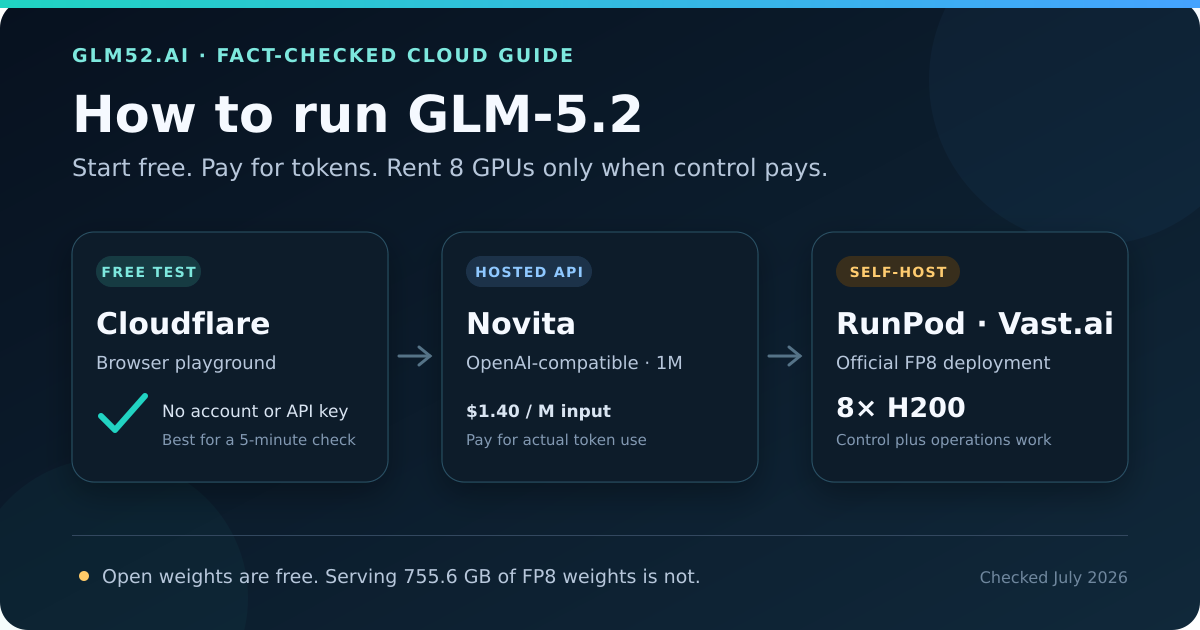
“How can I run GLM-5.2 for free?” sounds like one question, but it usually hides three different goals:
- I want to see whether the model is any good. Use a free browser playground.
- I want to add GLM-5.2 to an app today. Use a hosted API and pay only for tokens used.
- I want the weights under my control. Rent a multi-GPU server and self-host the official FP8 checkpoint.
Confusing those goals gets expensive. GLM-5.2 is a roughly 753-billion-parameter mixture-of-experts model. Only about 40 billion parameters are active for a token, but the server still needs the full expert library available. The official FP8 checkpoint alone is about 755.6 GB, before the KV cache, runtime buffers, and operating-system headroom. A free notebook GPU is not a realistic full-model host.
This guide gives you a repeatable free test, working API and self-host commands, current cost arithmetic, and a decision rule that includes the expenses cloud calculators often hide.
In this guide
Section titled “In this guide”- What “free” really means
- The decision in 30 seconds
- Test GLM-5.2 free in Cloudflare
- Use GLM-5.2 through Novita’s hosted API
- Self-host GLM-5.2 on RunPod
- Deploy GLM-5.2 on Vast.ai
- Compare the real cost
- Choose the right route
- Production checklist
- Frequently asked questions
What “free” really means
Section titled “What “free” really means”Four offers are regularly described as “free,” but they are not interchangeable.
| Type of access | What is actually free | What still costs money |
|---|---|---|
| Browser playground | A limited interactive model test | Automation, guaranteed capacity, production support |
| Open weights | Model files, configuration, and use under the MIT license | GPUs, storage, bandwidth, engineering, uptime |
| Signup credit | A temporary balance, if the provider currently offers one | Usage after the credit expires or is exhausted |
| Hosted API | Nothing by default; billing follows tokens used | Input, cached input, output, and sometimes ancillary services |
The durable free options are therefore Cloudflare’s public playground for evaluation and the official Hugging Face repository for artifact inspection. A provider may show a welcome promotion in your account, but promotions vary by date, region, verification status, and eligible model. Do not design a production budget around an offer that is not visible in your own billing dashboard.
GLM-5.2’s MIT-licensed weights make self-hosting legally approachable, not computationally free. For exact BF16, FP8, and community quantized file sizes, read our GLM-5.2 local hardware guide.
The decision in 30 seconds
Section titled “The decision in 30 seconds”| Route | Upfront setup | Published price checked July 15, 2026 | Context offered | Best use |
|---|---|---|---|---|
| Cloudflare browser playground | None | Free interactive test | Provider-hosted limit; not a production promise | Five-minute behavior check |
| Cloudflare Workers AI API | Cloudflare account and API integration | $1.40/M input, $0.26/M cached input, $4.40/M output | 262,144 tokens | Edge application with a shorter hosted context |
| Novita API | API key | $1.40/M input, $0.26/M cached input, $4.40/M output | 1,048,576 tokens; max output 131,072 | Fastest path to a managed full-context endpoint |
| RunPod 8×H200 Pod | GPU instance, storage, serving stack | $4.39 per H200-hour; $35.12/hour for eight | You allocate it; official H200 recipe starts at 131,072 | Pinned checkpoint and dedicated capacity |
| Vast.ai 8×H200 offer | Marketplace selection or model template | H200 page showed $3.53/GPU-hour; $28.24/hour for eight | You allocate it; hardware and offer dependent | Lower listed compute price with marketplace trade-offs |
| Hugging Face model repository | None to inspect; substantial setup to serve | Weights are free to download | Model supports up to 1,048,576 positions | License, config, files, and revision pinning |
Prices are snapshots, not quotes. GPU availability and Vast.ai marketplace prices can move; storage and network traffic are separate. The hosted model behind Cloudflare currently exposes less context than the model’s architectural maximum. Always re-check the linked provider pages before spending money.
Test GLM-5.2 free in Cloudflare
Section titled “Test GLM-5.2 free in Cloudflare”Cloudflare’s Workers AI model page exposes a browser LLM playground that requires no setup or authentication. This is the cleanest answer if “run” means “try the model now.”
A useful two-minute test
Section titled “A useful two-minute test”- Open the official model page and launch Try in Playground.
- Use a task you already know how to judge—preferably one containing a subtle failure mode.
- Ask for assumptions, an answer, and a self-check in separate sections.
- Change one variable at a time and save the exact prompt and response.
- Repeat the same prompts through any API you are considering.
This compact template produces more signal than “write a snake game”:
Task: Review the retry policy below for production failure modes.Context: [paste a small, non-sensitive example]
Return:1. Assumptions you had to make2. The three highest-risk failures, ranked3. A corrected design with pseudocode4. One test that could falsify your recommendation
Do not invent missing metrics. Mark uncertainty explicitly.
Why this works: it tests instruction following, prioritization, technical reasoning, and calibration, not just fluent prose. For a serious comparison, build a private set of 20–50 tasks and score exact correctness, tool-call validity, time to first token, total latency, and billed tokens. Our GLM-5.2 vs. GPT-4o guide explains how to create that evaluation instead of trusting a single anecdote.
Where “free” stops
Section titled “Where “free” stops”The browser playground is not a free production API quota. Cloudflare lists the model ID as @cf/zai-org/glm-5.2; API usage is billed at the published token rates shown above. The hosted model page currently reports a 262,144-token context window, not the underlying model’s full 1,048,576 positions.
If you move to the API, keep your token out of source control and call it from a server-side Worker:
curl "https://api.cloudflare.com/client/v4/accounts/$CLOUDFLARE_ACCOUNT_ID/ai/run/@cf/zai-org/glm-5.2" \ --request POST \ --header "Authorization: Bearer $CLOUDFLARE_AUTH_TOKEN" \ --header "Content-Type: application/json" \ --data '{ "messages": [ {"role": "system", "content": "State uncertainty and never invent measurements."}, {"role": "user", "content": "Review this retry design for failure modes."} ] }'Choose Cloudflare when zero-setup testing or an edge-native integration matters. Choose a different route if you require the full 1M context or control over the exact checkpoint and serving parameters.
Use GLM-5.2 through Novita’s hosted API
Section titled “Use GLM-5.2 through Novita’s hosted API”Novita hosts zai-org/glm-5.2 as a serverless endpoint with an OpenAI-compatible interface. Its official model page lists function calling, structured output, reasoning, a 1,048,576-token context window, and up to 131,072 output tokens.
This is the practical middle ground: no 755.6 GB download, no eight-GPU cluster to keep busy, and no serving framework to patch. Your application talks to a familiar API while Novita operates the model.
Call GLM-5.2 with the OpenAI Python SDK
Section titled “Call GLM-5.2 with the OpenAI Python SDK”Create a Novita key in the provider dashboard and store it in NOVITA_API_KEY. Do not put an API key in browser JavaScript or commit it to Git.
import osfrom openai import OpenAI
client = OpenAI(    api_key=os.environ["NOVITA_API_KEY"],    base_url="https://api.novita.ai/openai",)
response = client.chat.completions.create(    model="zai-org/glm-5.2",    messages=[        {            "role": "system",            "content": "Be precise. Separate verified facts from assumptions.",        },        {            "role": "user",            "content": "Design an idempotent webhook retry strategy.",        },    ],    max_tokens=1024,)
print(response.choices[0].message.content)
Install the client with pip install openai, run the file server-side, and log the returned model identifier, token usage, latency, and errors. Pin your own prompt and evaluation version even when the provider’s public model ID stays the same.
What a request costs
Section titled “What a request costs”Novita’s public GLM-5.2 price at our review date was $1.40 per million input tokens, $0.26 per million cached input tokens, and $4.40 per million output tokens.
For a request with 100,000 uncached input tokens and 10,000 output tokens:
input = 0.10 × $1.40 = $0.140output = 0.01 × $4.40 = $0.044total = $0.184If all 100,000 input tokens qualify for the published cached-input rate, the arithmetic becomes $0.070. The $0.26 cached rate is about 81.4% below the $1.40 uncached-input rate. That is not an automatic discount: cache eligibility depends on the provider’s current rules and whether your repeated prompt prefix is actually reused.
Choose Novita when you need the full advertised context, OpenAI-compatible integration, burst capacity, or a quick proof of concept. Self-host when a pinned checkpoint, data-location requirement, custom runtime, or sustained utilization outweighs the operations work.
Self-host GLM-5.2 on RunPod
Section titled “Self-host GLM-5.2 on RunPod”RunPod gives you a dedicated GPU Pod rather than a managed per-token endpoint. The official RunPod pricing page listed H200 Pods at $4.39 per GPU-hour on July 15, 2026, so an eight-GPU node costs $35.12 per running hour before storage or network charges.
Why eight H200s? Each H200 has 141 GB of GPU memory. The official vLLM GLM-5.2 recipe says the FP8 checkpoint fits a single 8×H200 node and uses tensor parallelism across all eight devices. Its H200 example deliberately limits context to 131,072 tokens. The full 1M recipe targets 8×B200, a useful reminder that a model supporting 1M context does not mean every deployment can allocate it.
Capacity to reserve before launch
Section titled “Capacity to reserve before launch”- GPU: one node with 8×H200 and working high-speed GPU interconnects;
- Storage: at least 1 TB of fast persistent space for the 755.6 GB FP8 checkpoint, cache, and logs;
- Runtime: vLLM 0.23 or later, using the official GLM-5.2 image/recipe;
- Network: enough download bandwidth and time for a three-quarter-terabyte cold start;
- Security: a private network, firewall, and API key—never expose port 8000 unauthenticated.
Download time is easy to underestimate. At a perfect 1 Gbit/s, transferring 755.6 GB takes about 101 minutes; at 10 Gbit/s it takes about 10 minutes. Protocol overhead, source throttling, unpacking, and shared-host contention make real cold starts longer. Persistent storage can avoid repeated downloads, but it keeps accruing cost according to the provider’s current terms.
Start the official FP8 checkpoint with vLLM
Section titled “Start the official FP8 checkpoint with vLLM”The following adapts the publisher-maintained vLLM recipe by adding an API key and a persistent Hugging Face cache:
export GLM_API_KEY="$(openssl rand -hex 32)"
docker run --gpus all \  -p 8000:8000 \  --ipc=host \  -v ~/.cache/huggingface:/root/.cache/huggingface \  vllm/vllm-openai:glm52 zai-org/GLM-5.2-FP8 \    --tensor-parallel-size 8 \    --tool-call-parser glm47 \    --reasoning-parser glm45 \    --enable-auto-tool-choice \    --served-model-name glm-5.2-fp8 \    --max-model-len 131072 \    --api-key "$GLM_API_KEY"
Treat this as a documented baseline, not a production architecture. Put TLS and authentication in front of the server, pin the Docker image and model revision, monitor GPU memory and failed requests, and increase context or concurrency one dimension at a time.
Deploy GLM-5.2 on Vast.ai
Section titled “Deploy GLM-5.2 on Vast.ai”Vast.ai is a GPU marketplace. Its official GLM-5.2 model page offers a one-click template and recommends 8×H200. That removes some image and command-line setup, but you are still renting and operating a third-party host; “one click” does not remove capacity, security, data, or reliability decisions.
The official H200 pricing page displayed $3.53 per GPU-hour at our check, or $28.24/hour for eight. Marketplace offers can vary by host, reliability score, location, storage, bandwidth, and contract type, so use that number as a snapshot rather than a guaranteed checkout price.
Before renting an offer, verify:
- All eight H200s are in one compatible machine, with the interconnect required by the serving stack.
- The disk is large and fast enough for the FP8 weights plus cache and logs.
- Download bandwidth, port exposure, host reliability, and data-location terms fit the workload.
- The final quote includes compute, storage, and bandwidth—not just the green GPU price.
- You know what Stop and Destroy/Delete do. Vast’s billing documentation says stopped instances can continue billing storage until deleted.
Interruptible offers can be cheaper, but eviction can erase a long model load or generation job. Use them for fault-tolerant batch experiments with checkpoints, not for an endpoint that promises uptime. Reserved discounts can help steady workloads only after you have measured that the selected host and model configuration are stable.
You can use Vast’s official model template or the same vLLM command from the RunPod section. In either case, start at 131K context on 8×H200, run a load test, and watch peak KV-cache usage before increasing the limit.
Compare the real cost
Section titled “Compare the real cost”Hourly GPU price and per-token API price measure different things. A dedicated server buys capacity for an hour whether you send zero requests or keep it saturated; an API charges for actual token use and hides the GPU utilization from you.
For intuition, reuse the $0.184 Novita example: 100K uncached input plus 10K output.
| Option | Published raw price | Equivalent $0.184 API requests per hour |
|---|---|---|
| Novita hosted API | $0.184 per example request | Pay per completed request |
| Vast.ai 8×H200 snapshot | $28.24/hour | About 153 requests |
| RunPod 8×H200 list price | $35.12/hour | About 191 requests |
This is a break-even intuition, not a throughput benchmark. A tuned eight-GPU server can batch concurrent requests, while long prompts, output length, latency targets, and framework settings determine real throughput. The comparison also gives self-hosting an unrealistically generous start because it excludes storage, data transfer, cold starts, failed jobs, observability, and engineering time.
The more useful monthly equation is:
self-hosted cost = running GPU-hours                 + persistent storage                 + downloads and network traffic                 + idle and failed-job time                 + engineering and on-call work
hosted API cost  = uncached input tokens                 + eligible cached input tokens                 + output tokens                 + retries and provider-specific extras
For bursty evaluation and early products, the API normally wins because idle cost is zero. Dedicated GPU rental becomes plausible when utilization is consistently high, batching is effective, a pinned checkpoint matters, or compliance and network boundaries demand control. Measure at least a week of real token volume before committing to a reserved GPU contract.
Choose the right route
Section titled “Choose the right route”Choose Cloudflare’s playground if…
Section titled “Choose Cloudflare’s playground if…”You have five minutes, no account, and one question: “Is this model worth evaluating?” It is the only route in this guide that is both immediate and genuinely free for an interactive test.
Choose Novita if…
Section titled “Choose Novita if…”You need an OpenAI-compatible production prototype, full advertised context, function calling, or usage that is bursty enough to make an always-on 8×H200 node wasteful. Put a spend alert and application-side token limits in place before inviting users.
Choose RunPod if…
Section titled “Choose RunPod if…”You want a dedicated multi-GPU machine, a conventional cloud-Pod workflow, and control over vLLM, checkpoint revision, request scheduling, and logs. Budget for storage and cold-start time, not just GPU-hours.
Choose Vast.ai if…
Section titled “Choose Vast.ai if…”You are price-sensitive, can assess marketplace hosts, and accept variable availability and operational responsibility. The official GLM-5.2 template is a convenient starting point, not a substitute for security and reliability checks.
Choose Hugging Face if…
Section titled “Choose Hugging Face if…”You want to inspect the model card, MIT license, configuration, tokenizer, or checkpoint shards without claiming you can serve them on a free notebook. The official repositories are zai-org/GLM-5.2 and zai-org/GLM-5.2-FP8.
Production checklist
Section titled “Production checklist”Before moving any GLM-5.2 experiment into a product, record these decisions:
- Evaluation: Does the exact endpoint or checkpoint pass 20–50 representative private tasks?
- Context: What is your p95 prompt length? Do not reserve 1M tokens because the label permits it.
- Output: Set a maximum generated length; 131K possible output is not a sensible default bill.
- Cost controls: Add per-user limits, timeouts, retry ceilings, spend alerts, and a hard kill switch.
- Reproducibility: Log provider, model ID, checkpoint/framework revision, sampling settings, and date.
- Security: Keep keys server-side, redact sensitive prompts, and authenticate every self-hosted endpoint.
- Reliability: Measure p50/p95 latency, error rate, rate-limit behavior, and recovery from provider or GPU failure.
- Privacy: Review the provider’s retention and data-use terms; self-hosting is private only if your own infrastructure is configured that way.
- Tool safety: Validate tool arguments against a schema and require approval for destructive actions. Model-generated tool calls are untrusted input.
- Exit plan: Keep an evaluation suite and provider abstraction so a pricing or model change does not trap the application.
If adaptation rather than serving is your next step, our GLM-5.2 fine-tuning tools guide explains why model scale changes the practical options.
Frequently asked questions
Section titled “Frequently asked questions”Is GLM-5.2 really free?
Section titled “Is GLM-5.2 really free?”The official weights are free to download and use under the MIT license, and Cloudflare provides a free browser playground for interactive testing. Hosted API tokens, cloud GPUs, storage, and network traffic are paid resources. “Open-weight” and “free inference” are different claims.
Can I run GLM-5.2 on a laptop or free Colab GPU?
Section titled “Can I run GLM-5.2 on a laptop or free Colab GPU?”Not as the complete general-purpose model. The official FP8 checkpoint is about 755.6 GB, and even aggressive community quantizations require hundreds of gigabytes before runtime overhead. An ordinary laptop can call a hosted API; it cannot make the server-side capacity disappear.
Why does an MoE model with about 40B active parameters need eight H200s?
Section titled “Why does an MoE model with about 40B active parameters need eight H200s?”“Active” describes how many expert parameters participate in one token’s computation. The router may choose different experts for the next token, so the entire roughly 753B-parameter expert set must remain accessible. MoE reduces computation more directly than it reduces weight storage.
Do eight H200s guarantee the full 1M context window?
Section titled “Do eight H200s guarantee the full 1M context window?”No. The official vLLM H200 recipe caps context at 131,072, while its full 1M example uses eight B200s. Context consumes KV-cache memory and prefill compute; concurrency multiplies the pressure. Validate the exact server configuration instead of inferring capacity from the model name.
Is Novita cheaper than renting GPUs?
Section titled “Is Novita cheaper than renting GPUs?”For low, bursty, or uncertain usage, it often is because you do not pay for idle GPUs or operate the serving stack. At sustained high utilization, a well-tuned dedicated cluster can become cheaper per completed task. The crossover depends on your prompt/output mix, batching, latency target, storage, failures, and engineering cost—not one headline rate.
Does the Novita affiliate link give me a special discount?
Section titled “Does the Novita affiliate link give me a special discount?”We found no official evidence that this specific affiliate URL creates a buyer-only discount, so we do not claim one. You receive Novita’s current public pricing and any account offer the dashboard independently shows. The link supports GLM52.ai through Novita’s published affiliate attribution without an added charge from us.
Which route is best for private data?
Section titled “Which route is best for private data?”No route is private by label alone. With a hosted API, review retention, training-use, region, and enterprise-control terms. With self-hosting, verify the cloud host, disk lifecycle, access controls, logging, network exposure, and operator access. Choose from documented controls, not assumptions.
Is the lowest GPU-hour price always the cheapest deployment?
Section titled “Is the lowest GPU-hour price always the cheapest deployment?”No. A cheaper host can cost more after storage, slow downloads, failed starts, lower reliability, or idle time. Compare cost per successful workload at your latency target, including operational time, rather than cost per listed GPU-hour.
Bottom line
Section titled “Bottom line”Run GLM-5.2 free in Cloudflare’s playground to decide whether it deserves a real evaluation. If it does, replay the same test set through Novita before taking on infrastructure. Rent RunPod or Vast.ai only when you can state why checkpoint control or sustained utilization is worth an eight-GPU deployment.
That sequence preserves the main benefit of open weights—choice—without paying the infrastructure bill before the model proves useful.
Sources and methodology
Section titled “Sources and methodology”- Official GLM-5.2 model card, configuration, and MIT license
- Official GLM-5.2 FP8 checkpoint
- Cloudflare Workers AI GLM-5.2 model, limits, pricing, and playground
- Novita GLM-5.2 model features, limits, and pricing
- Novita affiliate program terms
- Official vLLM GLM-5.2 deployment recipes
- Official SGLang GLM-5.2 deployment cookbook
- RunPod GPU pricing
- RunPod referral-program rules
- Vast.ai GLM-5.2 model template
- Vast.ai H200 pricing
- Vast.ai instance billing documentation
We prioritized publisher and provider documentation for model behavior, compatibility, prices, and terms. Price snapshots were checked on July 15, 2026. Arithmetic is derived transparently from those published figures; it is not a provider quote or performance guarantee. We found no Google Search Console or Analytics data for this URL during the review window, so the rewrite is based on live search-result intent, primary documentation, and the gaps in the previous article—not fabricated traffic conclusions.
Affiliate Disclosure
The Novita, RunPod, and Vast.ai CTAs are affiliate or referral links. If you register or purchase through them, GLM52.ai may receive a commission or referral credit without an added charge from us. The location-dependent RunPod new-user credit described above requires a new account and a first $10 load; other public pricing and provider-dashboard offers apply. We do not claim any additional unverified link-only discount. No provider reviewed or approved this article.