
How to Use GLM-5.2 in Claude Code with 1M Context
Independent research — not an official Z.ai publication.Identity and provider disclosure

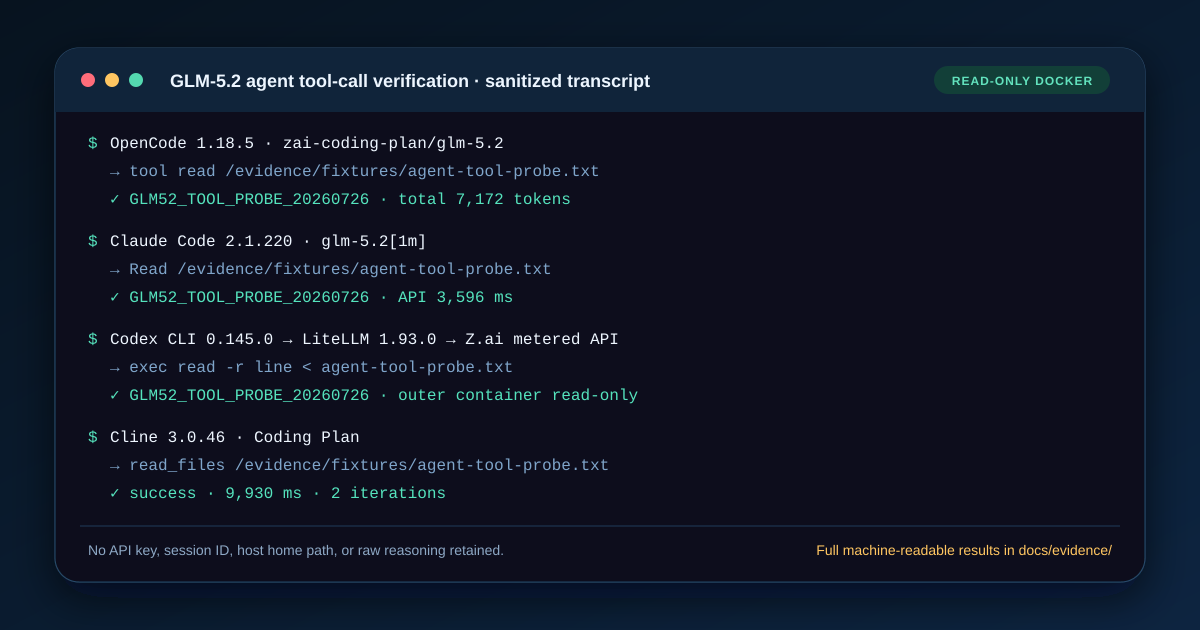
To use GLM-5.2 directly in Claude Code, connect an active GLM Coding Plan to Z.ai’s Anthropic-compatible endpoint, map Sonnet and Opus to glm-5.2[1m], then verify a request and a harmless Read call. The pinned response returned CLAUDE_PLAN_OK in 2.648 seconds; the tool probe returned the fresh file sentinel in 3.613 seconds.
The required pay-as-you-go scenario is also tested and documented here, but its result is negative: the global Z.ai metered endpoint is not a direct Claude Code gateway. Use a client that speaks OpenAI-compatible Chat Completions or a deliberately operated translation gateway; do not relabel a 404 as an authentication problem.
In this guide
Section titled “In this guide”- Confirm the access route
- Add the Coding Plan settings
- Test the pay-as-you-go boundary
- Keep the Z.ai key outside the project
- Verify the model, response, and Read tool
- Budget the 1M context window
- Choose high or max effort
- Fix common failures
- Know what this setup proves
- Sources and method
Confirm the access route
Section titled “Confirm the access route”Z.ai’s model-switching guide defines this setup for existing GLM Coding Plan users. The plan is designed for supported interactive coding agents. It is not ordinary pay-as-you-go API credit, and its endpoint is not the OpenAI-compatible URL used by OpenCode, Cline, or an application backend.
| Client or job | Protocol | Documented endpoint or model ID | Use this page? |
|---|---|---|---|
| Claude Code with Coding Plan | Anthropic-compatible | https://api.z.ai/api/anthropic |
Yes |
| OpenCode with Coding Plan | OpenAI-compatible | https://api.z.ai/api/coding/paas/v4 |
Use the OpenCode guide |
| Claude Code with pay-as-you-go API | Anthropic client against OpenAI Chat route | https://api.z.ai/api/paas/v4, model glm-5.2 |
Direct test failed with HTTP 404 |
| General pay-as-you-go application | OpenAI-compatible | https://api.z.ai/api/paas/v4, model glm-5.2 |
Use the API provider guide |
This distinction prevents a frustrating error class: a valid key sent to the wrong product or protocol can still fail. If you have not chosen an access route, compare Coding Plan, API, and self-hosting before editing Claude Code.
Add the Coding Plan settings
Section titled “Add the Coding Plan settings”Claude Code documents user settings at ~/.claude/settings.json on macOS, Linux, and WSL, or %USERPROFILE%\.claude\settings.json on native Windows. Preserve the rest of the file. Add or update only the keys inside env:
{ "$schema": "https://json.schemastore.org/claude-code-settings.json", "env": { "ANTHROPIC_BASE_URL": "https://api.z.ai/api/anthropic", "ANTHROPIC_DEFAULT_HAIKU_MODEL": "glm-4.5-air", "ANTHROPIC_DEFAULT_SONNET_MODEL": "glm-5.2[1m]", "ANTHROPIC_DEFAULT_OPUS_MODEL": "glm-5.2[1m]", "CLAUDE_CODE_AUTO_COMPACT_WINDOW": "1000000", "CLAUDE_CODE_DISABLE_NONESSENTIAL_TRAFFIC": "1", "API_TIMEOUT_MS": "3000000" }}The model aliases matter because Claude Code can assign different work to its Haiku, Sonnet, and Opus slots. This map keeps the lightweight slot on glm-4.5-air and routes the two main slots to the long-context GLM-5.2 selector. Z.ai’s Claude Code page publishes the same mapping.
Do not replace a complete settings file with this example. A real file may also contain permission rules, hooks, plugins, or an organization policy. JSON objects can be merged; duplicate top-level keys, missing commas, and a second env object cannot.
You can syntax-check a copy without exposing a credential:
node -e 'JSON.parse(require("node:fs").readFileSync(process.argv[1], "utf8")); console.log("valid JSON")' \ "$HOME/.claude/settings.json"Syntax is only the first gate. Claude Code can load settings from managed, command-line, local, project, and user scopes. User settings have the lowest precedence. A project or local model override can therefore win even when this JSON is valid.
Test the pay-as-you-go boundary
Section titled “Test the pay-as-you-go boundary”The global metered route cannot be made compatible merely by replacing the URL and removing [1m]. We preserved and executed this negative probe:
{ "$schema": "https://json.schemastore.org/claude-code-settings.json", "env": { "ANTHROPIC_BASE_URL": "https://api.z.ai/api/paas/v4", "ANTHROPIC_DEFAULT_HAIKU_MODEL": "glm-5.2", "ANTHROPIC_DEFAULT_SONNET_MODEL": "glm-5.2", "ANTHROPIC_DEFAULT_OPUS_MODEL": "glm-5.2", "CLAUDE_CODE_DISABLE_NONESSENTIAL_TRAFFIC": "1", "API_TIMEOUT_MS": "300000" }}Claude Code 2.1.220 sent an Anthropic Messages-shaped request and received HTTP 404 after 1.589 seconds. Z.ai’s general API documentation exposes Chat Completions at this route. That is a protocol mismatch, not evidence that the model ID, key, or account is invalid.
For metered GLM-5.2 use, the simpler answer is OpenCode, Cline, Kilo, Crush, goose, Hermes, OpenClaw, Pi, or a direct application client. A translation gateway can theoretically convert protocols, but it adds data handling, feature-loss, logging, and operational risks; this article did not verify such a Claude Code gateway and does not label one as working.
Keep the Z.ai key outside the project
Section titled “Keep the Z.ai key outside the project”Z.ai’s example accepts ANTHROPIC_AUTH_TOKEN. Set it through your shell’s protected secret loader or credential manager. For a temporary current-shell test:
export ANTHROPIC_AUTH_TOKEN="your-zai-key"test -n "$ANTHROPIC_AUTH_TOKEN" && echo "Z.ai token is set"$env:ANTHROPIC_AUTH_TOKEN = "your-zai-key"if ($env:ANTHROPIC_AUTH_TOKEN) { "Z.ai token is set" }The presence checks do not print the secret. Do not use echo $ANTHROPIC_AUTH_TOKEN, put the key in .claude/settings.json inside a repository, paste it into an issue, or include it in a screenshot. Anthropic’s gateway documentation says this token is sent as authorization to the configured base URL, so treat it as a credential, not a model preference.
If a key has entered shell history, source control, a screenshot, or support text, revoke it in the provider console. Deleting the visible copy does not make an exposed credential safe again.
Verify the model, response, and Read tool
Section titled “Verify the model, response, and Read tool”Start a fresh terminal so it inherits the intended environment, then identify the installed client:
claude --versionclaudeInside Claude Code, run:
/statusRequire two visible facts:
- Setting sources includes the user file you edited, normally
~/.claude/settings.json. - Model shows
glm-5.2orglm-5.2[1m]for the active main slot.
Both Z.ai and Claude Code recommend /status for this check. Asking the model “what model are you?” is weaker evidence: a generated answer can repeat a system label or guess. The rendered status is client state.
After the status check, use a bounded, read-only task in a disposable directory before granting write or shell permissions:
printf 'CLAUDE_GLM52_%s\n' "$(date +%s)" > claude-glm52-check.txtAsk Claude Code to use Read on that file and return only its contents. A valid result contains a visible Read event and an exact match to the freshly generated token.
The pinned Docker evidence recorded:
| Claude Code 2.1.220 check | Result |
|---|---|
| Coding Plan response | CLAUDE_PLAN_OK, 2,648 ms wall / 2,270 ms API |
| Response tokens | 124 input, 25 output; model glm-5.2[1m] |
Coding Plan Read |
GLM52_TOOL_PROBE_20260726 returned, 3,613 ms wall / 3,596 ms API |
| Tool-call tokens | 230 input, 59 output, 1,856 cache-read |
| Direct metered route | HTTP 404, protocol incompatible |
A successful read proves one request and one built-in tool round trip; it does not prove long-session reliability, million-token recall, writes, shell execution, or every MCP server.
Budget the 1M context window
Section titled “Budget the 1M context window”Z.ai documents two required settings for the long-context Claude Code path: the glm-5.2[1m] selector and CLAUDE_CODE_AUTO_COMPACT_WINDOW set to 1000000. The GLM-5.2 model guide separately publishes a 1M context and 128K maximum output.
That capacity is not a promise that Claude Code can paste one million project tokens into a clean prompt. System instructions, tool definitions, existing messages, tool results, selected files, and output headroom share the window.
Use this worksheet:
project material= 1,000,000 auto-compact window− instructions and tool definitions− existing conversation and tool results− planned output allowance− safety marginAn illustrative allocation is:
1,000,000 − 70,000 − 120,000 − 64,000 − 50,000 = 696,000 tokens
The 70K, 120K, 64K, and 50K deductions are planning inputs, not measured Claude Code constants. Replace them with your own session counts. The arithmetic adds independent value because it exposes the real decision: every extra file competes with history, tools, output, and margin.
A five-percent margin in the example absorbs estimation error and late tool results. It does not guarantee acceptance. A plan tier, intermediary, client version, or account policy may expose a lower practical limit. A large accepted prompt also says nothing about recall quality; verify required facts and citations at the beginning, middle, and end of representative repositories.
Choose high or max effort
Section titled “Choose high or max effort”Z.ai documents a many-to-two mapping for Claude Code’s /effort command:
| Claude Code selection | GLM-5.2 effort used by Z.ai |
|---|---|
low, medium, high |
high |
xhigh, max, ultracode |
max |
This means moving from low to high does not select three distinct GLM levels on this route. Use high as the clear default label. Use max when a difficult refactor, multi-step diagnosis, or expensive failure justifies more reasoning and quota use.
Do not turn the mapping into a quality guarantee. It is a publisher-documented routing rule, not an independent benchmark. For the direct API’s separate reasoning_effort values and cost tradeoff, use the GLM-5.2 reasoning-effort guide.
Fix common failures
Section titled “Fix common failures”glm-5.2[1m] does not exist
Section titled “glm-5.2[1m] does not exist”Run claude update, open a new terminal, and check /status again. Z.ai explicitly lists an outdated Claude Code version as the first fix. Do not silently remove [1m] and continue to claim a one-million-token configuration.
/status shows the wrong settings source
Section titled “/status shows the wrong settings source”Confirm that you edited the file used by the Claude Code installation you launched. Native Windows, WSL, and Git Bash can resolve different home directories. Then inspect project and local settings: Claude Code gives them higher precedence than user settings.
The request returns 401 or 403
Section titled “The request returns 401 or 403”Confirm token presence without printing it, confirm the account has an active Coding Plan, and confirm ANTHROPIC_BASE_URL is exactly https://api.z.ai/api/anthropic. A general API key or OpenAI-compatible endpoint is not interchangeable with this plan route. Repeated retries do not fix a product or credential mismatch.
The metered /paas/v4 route returns 404
Section titled “The metered /paas/v4 route returns 404”Do not rotate the key first. This was the expected result in our direct pay-as-you-go probe: Claude Code’s Anthropic Messages request does not match the global route’s OpenAI Chat Completions protocol. Choose a compatible client or an independently audited gateway.
Context compacts early or the server rejects the request
Section titled “Context compacts early or the server rejects the request”Check all three boundaries: the [1m] model selector, the 1000000 auto-compact setting, and the provider/account limit. Then reduce selected project material and reserve explicit output headroom. The prompt-caching guide explains why caching can lower repeat-input cost without enlarging context.
Tools fail although plain text works
Section titled “Tools fail although plain text works”Separate transport from agent behavior. First require one short response. Then require one harmless read. Only then test edits, shell commands, MCP, subagents, and long sessions. A text response proves authentication and response parsing once; it does not prove every Claude Code tool schema or permission path.
Images appear to work
Section titled “Images appear to work”GLM-5.2 itself is text input/text output in the cited model guide. A Claude Code image workflow can involve a separate vision or MCP component. The GLM-5.2 image-support guide shows how to trace which component handled the pixels.
Know what this setup proves
Section titled “Know what this setup proves”The documented settings and live run prove one direct Coding Plan route. A valid /status proves that Claude Code loaded a settings source and selected a model name. The exact response plus sentinel read prove one request and one tool exchange at one time. The 404 separately proves that the tested direct pay-as-you-go URL was not compatible with Claude Code’s protocol.
None of those prove perfect one-million-token recall, a fixed plan quota, stable latency, model identity at every intermediary, or production reliability. Record the Claude Code version, endpoint class, model label, effort, task, tool permissions, context estimate, timestamp, and visible result when a decision depends on the test.
Sources and method
Section titled “Sources and method”- Z.ai Claude Code guide — endpoint, environment variables, model mapping, and
/statusflow. - Z.ai model-switching guide —
[1m], auto-compaction, effort mapping, and missing-model fix. - Z.ai GLM-5.2 guide — input/output modality, context, maximum output, and general API model ID.
- Z.ai Coding Plan overview — subscription and supported-tool boundary.
- Claude Code settings — settings scopes, precedence, validation, and status inspection.
- Claude Code LLM gateway guide — custom base URL, authorization token, and provider model routing.
The article was rechecked on July 26, 2026. The live evidence used Claude Code 2.1.220 in a disposable non-root Docker container with a read-only root filesystem and no writable host mount. It called both product URLs with their intended credential context, preserved only sanitized measurements, and removed the task environment afterward. The results remain bounded to one account, one version, and one point in time.