
Can You Run GLM-5.2 Locally? An Honest Hardware Guide
Independent research — not an official Z.ai publication.Identity and provider disclosure

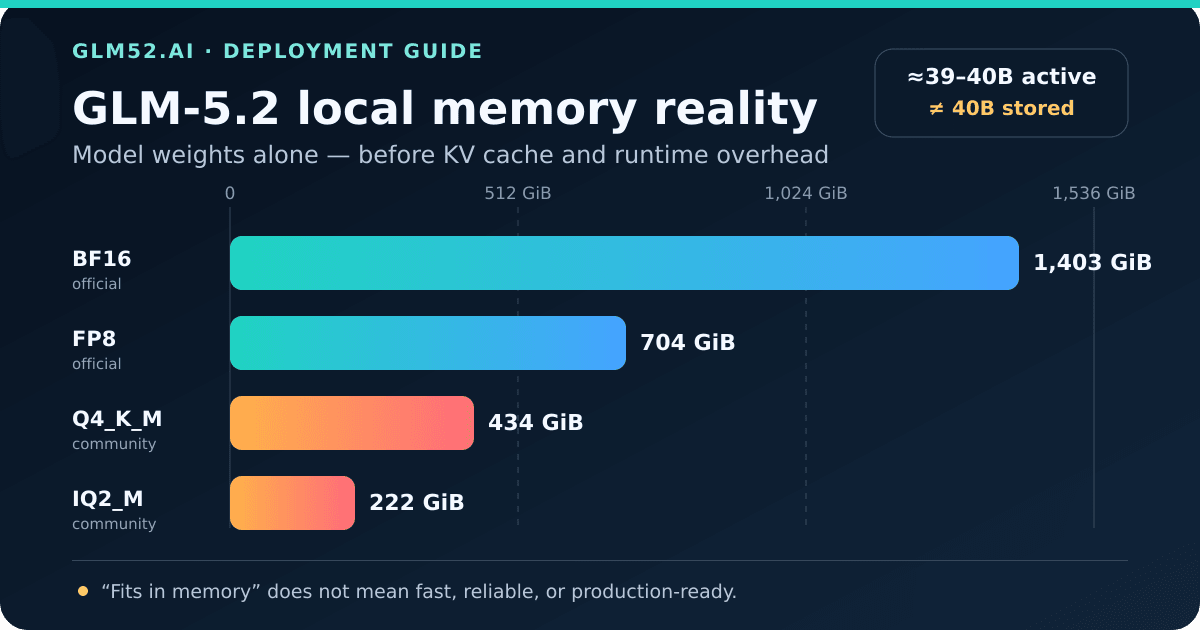
Repository weight sizes only. KV cache, runtime buffers, and the operating system need additional memory.
GLM-5.2 looks deceptively approachable on paper. It is a mixture-of-experts (MoE) model with about 40 billion parameters active for each token, which sounds similar to a model that might fit on a high-end workstation. The catch is that the router can select different experts for the next token. A general-purpose server still needs access to the complete set of roughly 753 billion parameters.
That one distinction explains most of the confusing hardware advice online.
This guide answers the practical questions people ask before downloading hundreds of model shards: What do the official files actually weigh? Which quantizations fit in 256 or 512 GB? Why does the one-million-token context window matter? Can CPU offload or SSD streaming rescue a smaller machine? And when is the API simply cheaper?
In this guide
Section titled “In this guide”- The decision in 30 seconds
- Why “40B active” does not mean “40B of memory”
- Exact GLM-5.2 model sizes
- How much working memory you really need
- What the 1M context window costs
- Realistic hardware paths
- Local deployment versus the API
- A deployment checklist that prevents expensive mistakes
- Frequently asked questions
The decision in 30 seconds
Section titled “The decision in 30 seconds”| Your available memory or hardware | What fits on paper | What we would actually do |
|---|---|---|
| Under 192 GiB total memory | None of the listed full-model quantizations | Use an API or choose a smaller model |
| 256 GiB total memory | The 222.2 GiB IQ2 artifact is barely small enough to store in memory | Treat as an experiment, not a useful default; quality and runtime headroom are both constrained |
| 384–512 GiB total memory | Q3 or IQ4-class artifacts; Q4 needs the upper end plus overhead | Viable for patient experimentation if the runtime supports the format and architecture |
| A verified multi-accelerator node—for example, 8×H200/B200, 4×GB300, or a supported AMD node | Official FP8 serving | Use the documented SGLang or vLLM recipe; begin with a shorter context limit |
| Eight B200 accelerators | Official vLLM recipe for the full 1M context | Use only when an actual workload justifies the cache and latency cost |
| Eight B300 accelerators or multiple nodes | Official BF16 serving | Reserve for research or infrastructure teams that specifically need BF16 |
“Fits on paper” is deliberately not the same as “runs well.” A model file can fit while the process still fails because the operating system, KV cache, compute buffers, memory allocator, and concurrent requests need space too. A CPU-only machine may also have enough capacity but not enough memory bandwidth to produce tokens at an acceptable rate.
Why “40B active” does not mean “40B of memory”
Section titled “Why “40B active” does not mean “40B of memory””The official Hugging Face model card reports approximately 753B total parameters. Its published configuration has 256 routed experts, with 8 routed experts selected per token, plus a shared expert. This sparse activation reduces the amount of computation performed for each token; it does not turn the checkpoint into a 40B-parameter download.
You may also see vLLM describe the model as roughly 743B total / 39B active. Hugging Face’s checkpoint metadata counts 753,329,940,480 parameters. The difference reflects counting conventions across published tooling; for capacity planning, we use the actual checkpoint bytes instead of either rounded label.
Think of the experts as books in a very large reference library:
- The model reads only a small set of books to produce the next token.
- The router can request a different set for the following token.
- Keeping only the last eight books would make the next routing decision impossible to satisfy.
- Therefore, all experts must be available somewhere—accelerator memory, host RAM, or slower storage.
This is why both statements can be true: GLM-5.2 performs roughly 40B-parameter-scale expert computation per token, yet its official BF16 checkpoint occupies about 1.5 TB.
MoE saves compute per token much more directly than it saves weight capacity. Offloading can move that capacity out of GPU memory, but every move down the memory hierarchy usually costs latency.
Exact GLM-5.2 model sizes
Section titled “Exact GLM-5.2 model sizes”We calculated the official figures from the total_size fields in the publishers’ Hugging Face weight indexes, not from rounded parameter marketing. The community figures are the combined file sizes reported for each split GGUF quantization in the Unsloth GLM-5.2-GGUF repository. They were checked on July 15, 2026.
If the hardware decision below leads to the official FP8 checkpoint, use the dedicated GLM-5.2 FP8 download and 141-shard verification guide to pin the Hub revision, preview exact transfer bytes, reject an incomplete snapshot, and preserve a checksum receipt before the serving runtime reads it.
After that snapshot starts successfully, a finite prompt collection can use the
dedicated GLM-5.2 vLLM offline batch guide
to validate OpenAI-style JSONL, make thinking mode explicit, reconcile every
custom_id, and quarantine errors or truncated output. That file runner is for
bounded jobs; it is not a substitute for a durable inference service.
| Checkpoint or quantization | Publisher | Repository size | Size in GiB | Practical meaning |
|---|---|---|---|---|
| BF16 | Z.ai official | 1,506.7 GB | 1,403.2 GiB | Verified only on very-high-memory nodes such as 8×B300 or supported AMD nodes; otherwise multi-node |
| FP8 | Z.ai official | 755.6 GB | 703.7 GiB | Recommended official serving precision |
| Q8_0 GGUF | Unsloth community | 801.4 GB | 746.3 GiB | Larger than official FP8; mainly useful for compatible GGUF workflows |
| UD-Q6_K GGUF | Unsloth community | 625.9 GB | 582.9 GiB | Still beyond a 512 GiB system before runtime overhead |
| UD-Q5_K_M GGUF | Unsloth community | 560.8 GB | 522.3 GiB | Does not fit in 512 GiB before overhead |
| UD-Q4_K_M GGUF | Unsloth community | 465.8 GB | 433.8 GiB | A 512 GiB machine has limited space left for cache and runtime |
| UD-IQ4_XS GGUF | Unsloth community | 365.3 GB | 340.2 GiB | More capacity-friendly, but still a very large local deployment |
| UD-Q3_K_M GGUF | Unsloth community | 342.7 GB | 319.2 GiB | Leaves more headroom in a 384–512 GiB system at a greater quality risk |
| UD-IQ2_M GGUF | Unsloth community | 238.6 GB | 222.2 GiB | Extreme quantization; fitting is not evidence of acceptable quality |
There are three important caveats:
- GB and GiB are different. Storage vendors use decimal GB; operating systems and memory planning often use binary GiB. One TB of files is not one TiB.
- Repository size is not peak process memory. Loading, dequantization kernels, graph capture, communication buffers, and cache allocation can all increase the requirement.
- Quantization is a model change, not free compression. Lower bit depth can alter instruction following, long-horizon stability, coding accuracy, and tool-call reliability. Test the exact quantization on your own evaluation set.
How much working memory you really need
Section titled “How much working memory you really need”A useful first-pass capacity equation is:
working memory ≥ model weights + KV cache + runtime buffers + operating-system headroomEach term behaves differently.
Model weights are the non-negotiable baseline
Section titled “Model weights are the non-negotiable baseline”For pure GPU inference, the weights must be distributed across accelerator memory. For heterogeneous inference, some experts can live in system RAM and be fetched when routed. For storage-backed experiments, inactive weights may remain on NVMe until needed.
The farther the weights sit from the compute unit, the more the workload depends on bandwidth, routing locality, and caching. A successful model load proves capacity; it does not prove useful tokens per second.
KV cache grows with context and concurrency
Section titled “KV cache grows with context and concurrency”The KV cache stores attention state from earlier tokens so the model does not recompute the whole prompt for every new token. Its capacity grows approximately with:
cache bytes ∝ layers × cached dimensions × bytes per value × tokens × concurrent sequencesGLM-5.2 uses multi-head latent attention (MLA), which compresses the cached state relative to conventional attention. That is essential at this scale, but one million tokens multiplied by even a compact per-token state is still large.
Runtime overhead is workload-dependent
Section titled “Runtime overhead is workload-dependent”Serving engines reserve memory for temporary activations, communication, CUDA graphs, quantization scales, and memory fragmentation. Batching and parallel requests add cache pressure. Framework releases also differ in supported kernels and memory behavior.
For that reason, “the files leave 20 GiB free” is not a safe deployment plan. Start below the machine’s theoretical limit and measure peak allocated memory under the real maximum context and concurrency.
What the 1M context window costs
Section titled “What the 1M context window costs”The model configuration advertises 1,048,576 positions. The official GLM-5.2 release explains that long context changes the bottleneck: KV-cache capacity, long-context kernels, and CPU overhead become central deployment constraints. A one-million-token label is a maximum capability, not a recommendation to allocate every server that way.
Here is a transparent lower-bound calculation using the published configuration. GLM-5.2 has 78 layers, an MLA latent rank of 512, and a 64-dimensional RoPE key component. If a serving implementation caches those 576 values per layer and token, the latent state alone is approximately:
78 layers × (512 + 64) values × 2 bytes × 1,048,576 tokens= 94.2 GB, or 87.8 GiB, for one BF16 sequenceAt one byte per cached value, the same arithmetic is about 47.1 GB / 43.9 GiB. This is an engineering estimate, not a vendor memory guarantee. It excludes index data, allocator overhead, framework buffers, and additional sequences; an FP8 weight checkpoint also does not automatically imply a one-byte KV cache.
The practical conclusions are more important than the exact number:
- A full-length request can consume tens of gigabytes of cache even with MLA.
- Two concurrent long requests can require roughly twice the sequence cache.
- Output tokens must share the model’s context budget with the input.
- Prefilling one million tokens also takes real time and compute.
- Most coding, retrieval, and agent tasks should begin at 16K, 32K, or 128K and expand only when measured quality improves.
The official vLLM recipe uses eight B200 GPUs for the full one-million-token configuration. Its H200 example intentionally caps max-model-len at 131,072. That is a useful reality check: context is a capacity decision, not just a command-line number.
Treat compiler activation as a separate admission after the hardware fits. The
GLM-5.2 vLLM torch.compile support audit
shows how to pin the installed model class, reject unsupported eager fallback,
and require a positive compilation receipt plus output parity before measuring
a speedup.
If replicated sparse-MLA cache becomes the H200 limit, audit the exact GLM-5.2 vLLM decode context parallelism version and correctness gate before adding DCP. Stable vLLM support, later backend code, and model-level distributed-attention correctness are separate release boundaries.
Serving capacity does not determine decoding mode. Before comparing local output with the hosted API, pin the complete GLM-5.2 temperature, top P, and do_sample profile; the checkpoint stores temperature and top P but leaves the sampling flag unset.
Serving capacity also does not standardize repetition controls. Pin the engine and validate its GLM-5.2 repetition, frequency, and presence penalty contract before copying a hosted or local payload; the checked Z.AI, Transformers, vLLM, and SGLang routes expose different fields and bounds.
Realistic hardware paths
Section titled “Realistic hardware paths”Path 1: Use an API from an ordinary computer
Section titled “Path 1: Use an API from an ordinary computer”This is the sensible default when the goal is to build, evaluate, or use GLM-5.2 rather than study inference infrastructure. Your local machine only sends prompts and receives responses, so its GPU memory is irrelevant.
An API also lets you measure whether GLM-5.2 creates enough value before taking on model downloads, server utilization, monitoring, upgrades, and failure recovery. Our free-access comparison covers low-commitment ways to test the model first.
Path 2: Run an aggressively quantized model in 256 GiB
Section titled “Path 2: Run an aggressively quantized model in 256 GiB”The IQ2_M repository occupies 222.2 GiB. That leaves roughly 33.8 GiB in a nominal 256 GiB memory pool before the operating system and runtime are counted. It is a proof-of-fit target, not a comfortable configuration.
Expect compromises in three places:
- very short context or KV-cache offload;
- strict limits on concurrency;
- potential quality loss from approximately two-bit quantization.
If your project needs reliable coding, structured tool calls, or long autonomous runs, validate failure rates—not just a few conversational prompts—before calling this usable.
Path 3: Experiment in 384–512 GiB of unified or system memory
Section titled “Path 3: Experiment in 384–512 GiB of unified or system memory”This range opens the door to Q3 and IQ4 artifacts. A 512 GiB system can hold Q4_K_M on paper, but the 433.8 GiB artifact leaves much less working space than the headline memory number suggests.
If you are evaluating Apple’s newly announced workstation specifically, the GLM-5.2 M5 Ultra Mac Studio audit recalculates the 512GB headroom, separates llama.cpp from the current MLX and LM Studio boundaries, and defines the post-shipment buying gate.
Capacity is only half the story. Token generation repeatedly accesses selected expert weights. On CPU or unified-memory systems, sustained memory bandwidth, NUMA placement, runtime kernels, and expert caching determine whether the result feels interactive or glacial. Treat benchmark claims as hardware-and-build-specific unless they disclose model quantization, prompt length, decode length, and tokens per second.
Runtime admission is a separate gate from memory fit. The pinned
GLM-5.2 vLLM CPU sparse-attention audit
traces why the default positive index_topk currently reaches an unsupported
CPU path, why deleting the JSON key does not disable it, and what must pass
before an experimental dense fallback can count as functional support.
Path 4: Use CPU–GPU heterogeneous inference
Section titled “Path 4: Use CPU–GPU heterogeneous inference”KTransformers’ official GLM-5.2 tutorial shows how expert weights can be placed in host memory while GPUs handle other parts of the model. This can reduce accelerator-memory requirements, but it does not make the total weight capacity disappear.
The tutorial itself targets a server-class setup with eight GPUs, many CPU inference threads, and dual thread pools. Its conservative sample token limit is a reminder that offload and maximum context are separate problems. Heterogeneous inference is valuable engineering, not a laptop loophole.
Path 5: Serve official FP8 on eight accelerators
Section titled “Path 5: Serve official FP8 on eight accelerators”The SGLang GLM-5.2 cookbook recommends FP8 and documents verified support on H200, B200, B300, GB300, and several AMD Instinct platforms. Both SGLang and vLLM provide eight-way serving recipes.
For Blackwell capacity planning, our dedicated GLM-5.2 NVFP4 SGLang deployment guide audits NVIDIA’s 432.874 GiB tensor payload, separates B200/B300/GB300 recipe fields, and defines the canary gates required before replacing the FP8 control.
For AMD Instinct nodes, the dedicated GLM-5.2 AMD ROCm SGLang guide separates MI300X, MI325X, and MI355X capacity from upstream verification. It also pins the gfx950 correctness fix, exact ROCm images, five MI355X project benchmark rows, and the unverified BF16/MXFP4/MTP boundaries.
For Huawei Ascend, the dedicated GLM-5.2 vLLM Ascend deployment guide reconciles the stable plugin stack with corrected Atlas 800 A2/A3 topology, audits BF16/W8A8/W4A8C8 file floors, and keeps experimental 1M-context and repeated-accuracy gates visible.
Once the checkpoint and hardware route are fixed, the dedicated GLM-5.2 expert parallelism and EPLB guide calculates expert slots per rank, reconciles global redundant-expert semantics, and defines the workload gates required before dynamic rebalancing.
If repeated engine restarts are dominated by weight loading, the GLM-5.2 SGLang Weight Cache Daemon audit checks the current block-FP8 allowlist, rank-identity gaps, MTP conflict, parity harness, failure semantics, and rollback gates before a TP-only pilot.
This is the first path we would consider for production self-hosting because it uses an official checkpoint and supported serving stack. It is still not plug-and-play: tensor/expert parallel configuration, networking, context allocation, concurrency, observability, and quality regression tests all matter.
Hugging Face’s July 2026 incident gives this deployment choice a concrete defensive use case. Our evidence review of the Hugging Face breach and GLM-5.2 forensics separates the company’s confirmed self-hosting statement from the hardware, model configuration, and accuracy details it did not disclose.
Path 6: Serve BF16 only for a specific reason
Section titled “Path 6: Serve BF16 only for a specific reason”The official BF16 weights are 1.403 TiB before runtime overhead. On NVIDIA hardware, SGLang’s verified single-node recipe uses eight B300 accelerators; lower-capacity NVIDIA nodes require multi-node placement for full BF16. Its cookbook also documents single-node BF16 on high-memory AMD MI325X and MI355X systems.
Choose this route when research fidelity or a measured quantization regression justifies the added cost. “More bits must be better” is not enough—compare the exact FP8 and BF16 checkpoints on tasks that affect your product.
Why SSD streaming is a demo, not a default architecture
Section titled “Why SSD streaming is a demo, not a default architecture”NVMe storage can hold the model cheaply, and experimental runtimes can fetch expert data on demand. That makes previously impossible loads technically possible. But storage has much higher latency and lower effective bandwidth than RAM or accelerator memory, while routing can request new experts for every token.
The right question is not “Did it generate text?” It is:
- What were prompt ingestion and decode speeds separately?
- Was the test a warm cache or a cold start?
- How much RAM cached expert weights?
- How long were the prompt and output?
- Did performance survive a second concurrent request?
SSD-backed inference can be useful for research, occasional offline jobs, or demonstrating that the architecture works. It is rarely the baseline for an interactive product until a reproducible benchmark proves otherwise.
Local deployment versus the API
Section titled “Local deployment versus the API”Self-hosting wins on control: you can pin the exact checkpoint, keep traffic inside your chosen environment, instrument the serving stack, and avoid per-token billing. It loses when expensive hardware sits idle or a small team becomes responsible for model operations.
As checked on July 15, 2026, the official Z.ai pricing page lists GLM-5.2 at $1.40 per million input tokens, $0.26 per million cached input tokens, and $4.40 per million output tokens. Re-check the live page before budgeting because pricing and cache terms can change.
A simple monthly estimate is:
API cost = 1.40 × uncached input M + 0.26 × cached input M + 4.40 × output M| Hypothetical monthly usage | Estimated API bill |
|---|---|
| 100M uncached input + 20M output tokens | $228.00 |
| 100M input, 80M served from cache + 20M output | $136.80 |
| 1B uncached input + 200M output tokens | $2,280.00 |
These are arithmetic examples, not forecasts. Real bills depend on provider token accounting, cache eligibility, retries, and generated length.
Compare that bill with the fully loaded self-hosting cost:
hardware rental or amortization+ electricity and networking+ storage and download time+ engineering and on-call time+ spare capacity and failed jobs+ the cost of idle acceleratorsAPI access usually wins for evaluation, bursty use, and low-to-moderate volume. Self-hosting becomes more compelling when utilization is consistently high, data-location requirements are strict, a pinned checkpoint is essential, or custom serving research is itself the goal. Privacy is not automatic in either direction: evaluate the API’s data policy or your own infrastructure controls explicitly.
A deployment checklist that prevents expensive mistakes
Section titled “A deployment checklist that prevents expensive mistakes”Before renting or buying hardware, write down the service target:
- Quality: Which checkpoint and precision pass your task-specific evaluation?
- Context: What is the p95 prompt length, not the theoretical maximum?
- Concurrency: How many simultaneous sequences must meet the latency target?
- Speed: What time to first token and decode rate do users need?
- Capacity: Have you included weights, KV cache, runtime buffers, and headroom?
- Compatibility: Does the exact framework release support GLM-5.2’s architecture and quantization?
- Operations: How will you pin revisions, monitor failures, roll back, and protect the endpoint?
Then validate in this order:
- Test the API with a fixed 20–50 prompt evaluation set.
- Rent the intended hardware for a short proof of concept.
- Start with one request, an 8K–32K limit, and the publisher’s documented command.
- Record peak memory, prefill speed, decode speed, and output quality.
- Increase context and concurrency one at a time.
- Run a long soak test and failure-recovery exercise.
- Only then model monthly cost or purchase equipment.
Pin the model revision as well as the serving framework. A model name alone is not a reproducible deployment.
Once a pinned CUDA deployment fits, treat runtime accelerations as separate experiments. SGLang v0.5.18 enables GLM-5.2’s DSA prologue fusion on the eligible path; use the dedicated DSA indexer-fusion speed, memory, and rollback audit to compare it with the same-build split control before converting lower kernel count into a capacity or purchase assumption.
Frequently asked questions
Section titled “Frequently asked questions”Can I run GLM-5.2 on one gaming GPU?
Section titled “Can I run GLM-5.2 on one gaming GPU?”Not as a complete, general-purpose local model. Even the smallest community quantization in our comparison is 222.2 GiB before runtime overhead. A single GPU can participate in an offloaded experiment, but the remaining weights still need host memory or storage, and data movement becomes the limiting factor.
Can a high-memory Mac or CPU workstation run it?
Section titled “Can a high-memory Mac or CPU workstation run it?”Some unusually high-memory unified-memory or server workstations can hold a Q3/IQ4-class artifact. That answers the capacity question only. Runtime support, memory bandwidth, quantization quality, context allocation, and tokens per second determine whether it is useful. Reproduce the exact setup before treating “loads successfully” as a buying recommendation.
Does FP8 mean I need exactly 755.6 GB of GPU memory?
Section titled “Does FP8 mean I need exactly 755.6 GB of GPU memory?”No. That is the checkpoint’s repository weight size. You also need KV cache, runtime buffers, and operational headroom. The verified official recipes use more aggregate accelerator memory than the raw files occupy.
Do I get a 1M context window automatically?
Section titled “Do I get a 1M context window automatically?”No. The model supports up to 1,048,576 positions, but serving frameworks may set a lower limit, and your hardware must reserve enough cache. The official H200 vLLM example uses 131K; the full 1M recipe uses B200-class hardware.
Does a GGUF file guarantee my local runtime supports GLM-5.2?
Section titled “Does a GGUF file guarantee my local runtime supports GLM-5.2?”No. The runtime must support the model architecture, tokenizer, split files, quantization type, and required kernels. Confirm support in the exact release you will deploy; do not infer it from the file extension alone.
Is two-bit quantization “almost the same” as FP8?
Section titled “Is two-bit quantization “almost the same” as FP8?”That cannot be assumed. Compression errors can compound across long coding or agent tasks even when short chat responses look plausible. Compare both versions on exact-match checks, structured output validity, tool-call success, and long-horizon task completion.
Is GLM-5.2 open source?
Section titled “Is GLM-5.2 open source?”The official Hugging Face repository publishes the weights under the MIT license. We use the more precise term open-weight because released weights and a permissive license do not necessarily mean that all training data and the complete training pipeline are available.
Bottom line
Section titled “Bottom line”GLM-5.2 is locally runnable in the literal sense, but not casually local. Its MoE design reduces per-token compute while the full expert library still makes capacity the first problem. Official FP8 serving is a datacenter multi-accelerator job; community quantization can move experimentation into the 256–512 GiB range, with real trade-offs in quality, context, and speed.
For most people, the rational sequence is simple: validate value through an API, measure the context and volume you actually need, rent the intended hardware, and self-host only when control or sustained utilization pays for the operational burden.
If model quality—not infrastructure—is your next question, use our GLM-5.2 vs. GPT-4o evaluation framework to build a task-specific comparison. If you are considering adaptation, read the GLM-5.2 fine-tuning tools guide before assuming full-parameter training is practical.
Sources and methodology
Section titled “Sources and methodology”- Z.ai GLM-5.2 release and architecture overview
- Official GLM-5.2 model card, configuration, and license
- Official GLM-5.2 FP8 checkpoint
- SGLang verified GLM-5.2 deployment cookbook
- vLLM GLM-5.2 deployment recipes
- KTransformers heterogeneous inference tutorial
- GLM-5.2 technical report
- Unsloth community GGUF repository
- Official Z.ai API pricing
Official publisher sources are used for architecture, model limits, license, and verified deployment configurations. Community repositories are labeled as such and used only for artifact-size comparisons. All derived figures show their assumptions so they can be checked or updated.
Editorial Disclosure
The RunPod CTA is an affiliate or referral link. GLM52.ai may receive a commission or referral credit after qualifying usage without an added charge from us. Capacity, topology, networking, and prices can change. RunPod did not review or approve this article, and the relationship does not change the hardware requirements or deployment warnings.