
GLM-5.2 for Cline, Kilo, Crush and goose
Independent research — not an official Z.ai publication.Identity and provider disclosure

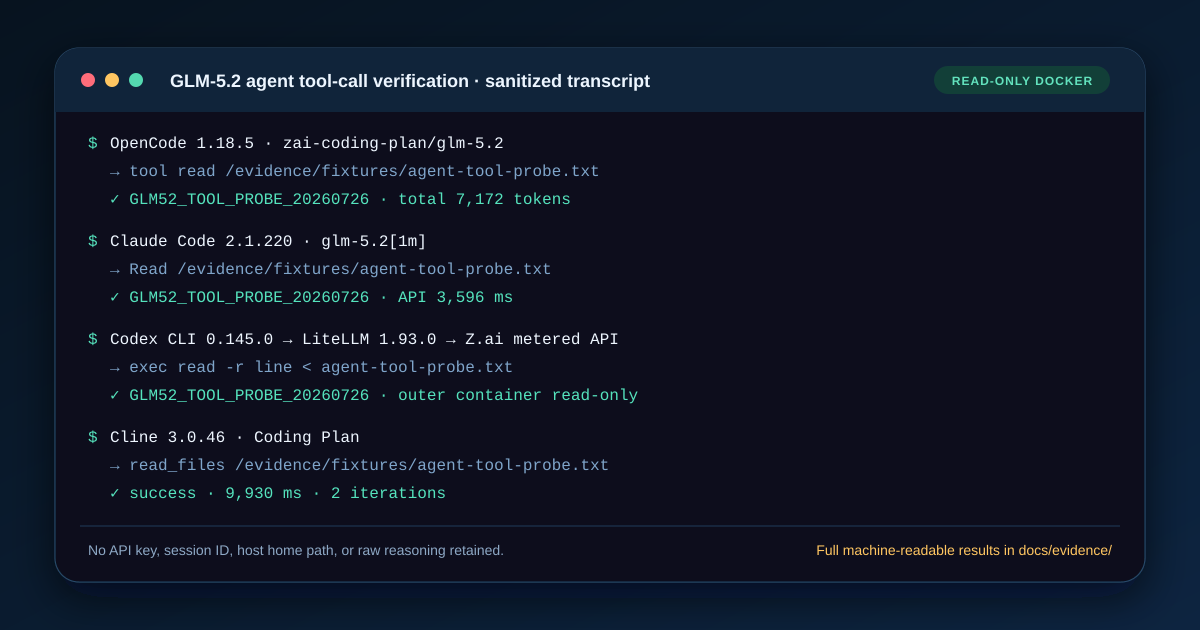
Cline, Kilo, Crush, and goose all worked with GLM-5.2 on both Z.ai access products in our July 26, 2026 Docker tests. That does not make their files interchangeable. Cline persists an authenticated provider in its data directory, Kilo uses an OpenCode-style provider map, Crush declares a typed openai-compat provider, and goose uses a declarative provider record with either an Anthropic or OpenAI engine.
The configurations below contain no credential. Export ZAI_API_KEY through a protected shell or secret manager, keep separate plan and metered keys if your account issues both, and rerun the exact response plus tool probe after any client upgrade.
In this guide
Section titled “In this guide”- Compare the measured results
- Configure Cline CLI
- Configure Kilo CLI
- Configure Crush
- Configure goose
- Reproduce the tool checks
- Diagnose route and tool failures
- Sources and test boundaries
Compare the measured results
Section titled “Compare the measured results”The prompts requested exact route-specific strings. Times include client work and one provider response; they are not controlled model-speed measurements.
| Client | Coding Plan result | Pay-as-you-go result | Tool check |
|---|---|---|---|
| Cline 3.0.46 | CLINE_PLAN_OK, 7,585 ms |
CLINE_PAYGO_OK, 6,328 ms |
read_files returned the sentinel |
| Kilo 7.4.16 | KILO_PLAN_OK, 13,131 ms |
KILO_PAYGO_OK, 12,485 ms |
read returned the sentinel |
| Crush 0.87.0 | CRUSH_PLAN_OK, 4,999 ms |
CRUSH_PAYGO_OK, 3,572 ms |
file read returned the sentinel |
| goose 1.44.0 | GOOSE_PLAN_OK, 3,282 ms |
GOOSE_PAYGO_OK, 2,031 ms |
shell read passed after an initial tool-selection failure |
For Cline, the recorded route requests reported 5,082/34 input/output tokens on Coding Plan and 5,084/7 on metered API. Kilo reported roughly 9,620 input tokens per smoke test because its default prompt was larger. goose reported only a few hundred on the response probe, then 2,963 total tokens on its tool probe. These client prompt differences are why the table should not be sorted as a model benchmark.
Configure Cline CLI
Section titled “Configure Cline CLI”Cline CLI’s documentation describes provider selection and isolated data directories. Version 3.0.46 accepted the short auth flags below. Run cline auth --help after upgrading; credential commands are especially likely to change.
Cline with Coding Plan
Section titled “Cline with Coding Plan”export ZAI_API_KEY="your-coding-plan-key"
cline auth \ -p openai \ -k "$ZAI_API_KEY" \ -m glm-5.2 \ -b https://api.z.ai/api/coding/paas/v4 \ --data-dir "$HOME/.cline-zai-plan"
cline \ -p openai \ -m glm-5.2 \ --data-dir "$HOME/.cline-zai-plan" \ "Reply with exactly: CLINE_PLAN_OK"Cline with pay-as-you-go API
Section titled “Cline with pay-as-you-go API”export ZAI_API_KEY="your-metered-api-key"
cline auth \ -p openai \ -k "$ZAI_API_KEY" \ -m glm-5.2 \ -b https://api.z.ai/api/paas/v4 \ --data-dir "$HOME/.cline-zai-api"
cline \ -p openai \ -m glm-5.2 \ --data-dir "$HOME/.cline-zai-api" \ "Reply with exactly: CLINE_PAYGO_OK"The separate data directories prevent a successful plan credential from hiding a broken metered setup. They also make cleanup and screenshot sanitization easier. A correct response through one directory says nothing about the other route.
Configure Kilo CLI
Section titled “Configure Kilo CLI”Kilo 7.4.16 accepted an openai-compatible provider map. Save one of these as the config under test through Kilo CLI’s documented config workflow; do not merge both under the same provider ID.
Kilo with Coding Plan
Section titled “Kilo with Coding Plan”{ "$schema": "https://app.kilo.ai/config.json", "model": "openai-compatible/glm-5.2", "provider": { "openai-compatible": { "options": { "apiKey": "{env:ZAI_API_KEY}", "baseURL": "https://api.z.ai/api/coding/paas/v4", "timeout": 300000 }, "models": { "glm-5.2": { "name": "GLM-5.2 via Coding Plan", "tool_call": true, "reasoning": true, "attachment": false, "limit": { "context": 1048576, "output": 131072 } } } } }}Kilo with pay-as-you-go API
Section titled “Kilo with pay-as-you-go API”{ "$schema": "https://app.kilo.ai/config.json", "model": "openai-compatible/glm-5.2", "provider": { "openai-compatible": { "options": { "apiKey": "{env:ZAI_API_KEY}", "baseURL": "https://api.z.ai/api/paas/v4", "timeout": 300000 }, "models": { "glm-5.2": { "name": "GLM-5.2 via pay-as-you-go API", "tool_call": true, "reasoning": true, "attachment": false, "limit": { "context": 1048576, "output": 131072 } } } } }}Use a fresh config directory for each probe and set ZAI_API_KEY only in the launching shell. The explicit attachment: false reflects GLM-5.2’s text-input boundary; it prevents a client feature from becoming a false model claim.
Configure Crush
Section titled “Configure Crush”Crush’s schema supports openai-compat providers. The cost fields below remain zero because subscription use is quota-based and this test did not turn a metered price table into client accounting. Use the provider console for billing truth.
Crush with Coding Plan
Section titled “Crush with Coding Plan”{ "$schema": "https://charm.land/crush.json", "providers": { "zai-plan": { "id": "zai-plan", "name": "Z.ai GLM Coding Plan", "type": "openai-compat", "base_url": "https://api.z.ai/api/coding/paas/v4", "api_key": "$ZAI_API_KEY", "discover_models": false, "models": [{ "id": "glm-5.2", "name": "GLM-5.2 via Coding Plan", "cost_per_1m_in": 0, "cost_per_1m_out": 0, "cost_per_1m_in_cached": 0, "cost_per_1m_out_cached": 0, "context_window": 1048576, "default_max_tokens": 131072, "can_reason": true, "supports_attachments": false }] } }, "models": { "large": { "model": "glm-5.2", "provider": "zai-plan", "max_tokens": 256 } }, "options": { "disable_provider_auto_update": true, "disable_metrics": true }}Crush with pay-as-you-go API
Section titled “Crush with pay-as-you-go API”{ "$schema": "https://charm.land/crush.json", "providers": { "zai-api": { "id": "zai-api", "name": "Z.ai metered API", "type": "openai-compat", "base_url": "https://api.z.ai/api/paas/v4", "api_key": "$ZAI_API_KEY", "discover_models": false, "models": [{ "id": "glm-5.2", "name": "GLM-5.2 via pay-as-you-go API", "cost_per_1m_in": 0, "cost_per_1m_out": 0, "cost_per_1m_in_cached": 0, "cost_per_1m_out_cached": 0, "context_window": 1048576, "default_max_tokens": 131072, "can_reason": true, "supports_attachments": false }] } }, "models": { "large": { "model": "glm-5.2", "provider": "zai-api", "max_tokens": 256 } }, "options": { "disable_provider_auto_update": true, "disable_metrics": true }}The environment placeholder is intentional. Confirm it is expanded by the client version you launch and inspect any generated state before committing a file. Never replace it with the literal secret.
Configure goose
Section titled “Configure goose”goose 1.44.0 accepted declarative providers with different engines for the two routes. Register each JSON record using the current goose provider workflow, export ZAI_API_KEY, and select the matching provider/model.
goose with Coding Plan
Section titled “goose with Coding Plan”{ "name": "zai_coding_plan", "engine": "anthropic", "display_name": "Z.ai GLM Coding Plan", "description": "Anthropic-compatible Coding Plan route", "api_key_env": "ZAI_API_KEY", "base_url": "https://api.z.ai/api/anthropic", "models": [{ "name": "glm-5.2", "context_limit": 1048576 }], "supports_streaming": true, "requires_auth": true}goose with pay-as-you-go API
Section titled “goose with pay-as-you-go API”{ "name": "zai_paygo", "engine": "openai", "display_name": "Z.ai metered API", "description": "OpenAI-compatible pay-as-you-go route", "api_key_env": "ZAI_API_KEY", "base_url": "https://api.z.ai/api/paas/v4/chat/completions", "models": [{ "name": "glm-5.2", "context_limit": 1048576 }], "supports_streaming": true, "requires_auth": true}The different URL shape is deliberate. This goose provider record expects the full Chat Completions URL for its OpenAI engine, while the preceding clients append the resource path to a base URL. Blindly normalizing those strings can create a doubled or missing /chat/completions.
Reproduce the tool checks
Section titled “Reproduce the tool checks”Create an unpredictable token in a disposable directory:
printf 'GLM52_AGENT_%s\n' "$(date +%s)" > agent-tool-probe.txtAsk each client to use its own read mechanism and return only the file’s content. Require the tool event plus exact final token:
| Client | Tested instruction shape | Expected native tool |
|---|---|---|
| Cline | “Use the file-reading tool to read agent-tool-probe.txt” |
read_files |
| Kilo | “Use read; return only the token” | read |
| Crush | “Read this exact relative path” | file read |
| goose | “Use shell to run sed -n '1p' on this file” |
shell |
goose deserves the explicit shell instruction. Its 1.44.0 developer extension exposed write, edit, shell, tree, and read_image, but no dedicated text-read tool. On the first attempt, GLM-5.2 called edit with empty before/after values and failed. The second prompt named shell and the exact read command; it then returned the sentinel. This was a tool-selection failure, not an API transport failure.
Remove the fixture afterward. One successful read does not authorize write, shell, browser, or MCP tools in a real repository.
Diagnose route and tool failures
Section titled “Diagnose route and tool failures”A 401 appears on only one route
Section titled “A 401 appears on only one route”Match the credential to the product. Coding Plan uses /api/coding/paas/v4 or the Anthropic plan endpoint; metered access uses /api/paas/v4. Verify key presence without printing it, then check the account product and region. Repeated retries cannot convert plan quota into API credit.
A 404 names Chat Completions
Section titled “A 404 names Chat Completions”Check whether the client expects a base URL or a full resource URL. goose’s metered provider uses the full /chat/completions; Kilo, Cline, and Crush use the base through /v4. Also reject doubled paths.
The exact response passes but tools fail
Section titled “The exact response passes but tools fail”The transport is probably working. Reduce the prompt to one explicit tool, review permissions, and inspect the emitted tool name and arguments. A client may expose a different tool vocabulary than the model assumed, as the goose failure demonstrated.
Context or output limits fail
Section titled “Context or output limits fail”The 1,048,576 and 131,072 values describe published GLM-5.2 maxima, not guaranteed route/account capacity. Client instructions, tool schemas, history, files, and output allowance share the budget. Start small and record the server’s exact limit before changing config.
An upgraded client ignores the file
Section titled “An upgraded client ignores the file”Confirm the installed version and current config path before debugging the API. Run the client’s config/status command if available, isolate global and project state, and repeat the exact response. The version label in this article is part of the configuration, not trivia.
Sources and test boundaries
Section titled “Sources and test boundaries”Documentation checked July 26, 2026:
- Z.ai Coding Plan quick start and other-tools configuration;
- Z.ai API quick start and HTTP introduction;
- Cline CLI overview;
- Kilo CLI documentation;
- Crush repository and configuration schema;
- goose repository and provider guide.
The runs used disposable, non-root, read-only Docker containers and secret-free archived configs. A pass proves one route request and the stated tool probe on the pinned version. It does not prove future CLI flags, fixed plan quota, all tools, or unattended production safety.