
Does GLM-5.2 Support Images?
Independent research — not an official Z.ai publication.Identity and provider disclosure

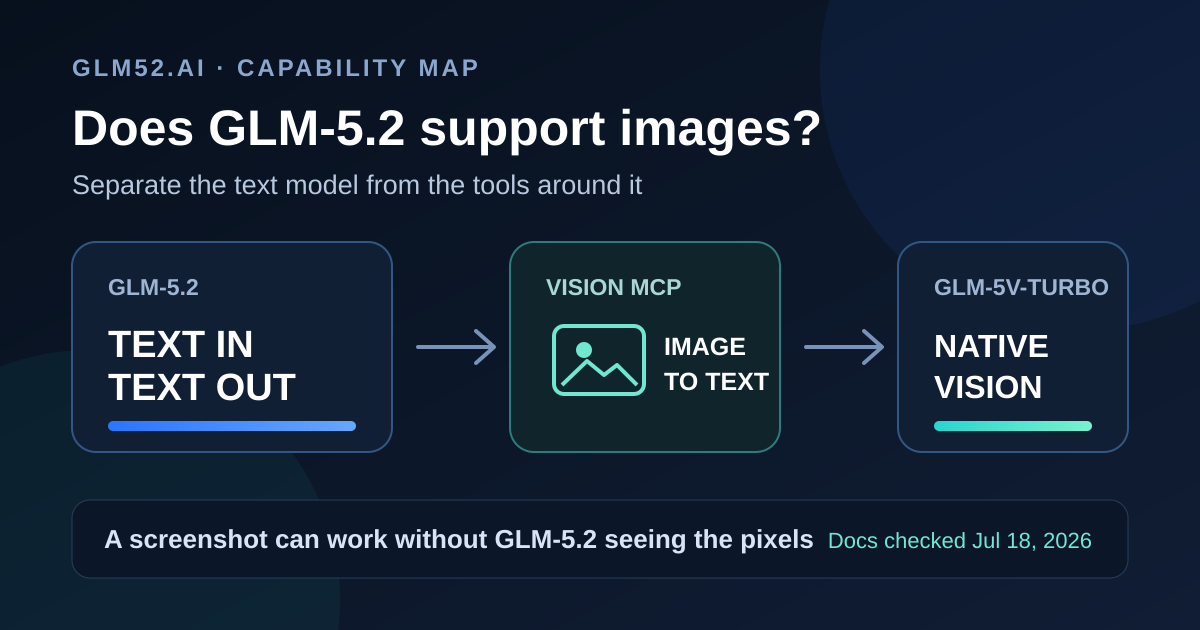
People reach this question after a small mystery: they paste a screenshot into a coding tool, keep GLM-5.2 selected, and receive an answer about the image. The app worked, but that result does not prove that GLM-5.2 saw the pixels.
The key is to separate the model from the product around the model. An app can add visual ability through another component. This guide maps those layers and gives you a quick audit for your own setup.
In this guide
Section titled “In this guide”- The documented answer
- Why a screenshot can seem to work
- The four image paths
- GLM-5.2 vs GLM-5V-Turbo
- How to verify which model saw the image
- Which path fits your task
- Questions people ask
- Sources and method
The documented answer
Section titled “The documented answer”The official GLM-5.2 model guide states two plain facts:
- input modalities: Text;
- output modalities: Text.
The same page lists function calling and MCP support. Those features let GLM-5.2 ask an external tool to do work. They do not place a visual encoder inside GLM-5.2.
Z.ai confirms this product split in its documentation menu. It puts GLM-5.2 under Language Models and puts GLM-5V-Turbo, GLM-4.6V, and GLM-OCR under Vision Language Models. The official GLM-5.2 checkpoint follows the same text and coding focus.
This distinction matters for screenshots, charts, diagrams, scanned pages, photos, and visual UI checks. A text description of an image can help GLM-5.2 reason. The description is not the image.
Why a screenshot can seem to work
Section titled “Why a screenshot can seem to work”A coding client controls more than the model picker. It can read files, call tools, inspect a webpage, extract text, and route a request to another model. Four common events can make a text-only model appear to have vision:
- The client runs OCR. It extracts words from the screenshot and sends those words to GLM-5.2.
- An MCP tool inspects the image. A vision model returns a caption, object list, coordinates, or UI diagnosis as text.
- The product routes the attachment. Another model handles the pixels while GLM-5.2 handles the plan or code.
- A browser tool exposes structure. The model reads the DOM or accessibility tree. It can name buttons and labels without checking color, overlap, clipping, or spacing.
Each path can produce a useful answer. Each path carries a different limit. OCR can miss layout. An accessibility tree can miss visual defects. A caption can drop small details. A hidden router can change cost, privacy terms, latency, and model identity.
For desktop and browser automation, our GLM-5.2 computer-use harness guide maps accessibility-tree, screenshot, grounding, executor, and permission layers without treating tool-mediated vision as a native model capability.
The four image paths
Section titled “The four image paths”| Path | Who receives the pixels? | What GLM-5.2 receives | Main limit |
|---|---|---|---|
| Direct GLM-5.2 request | No visual model | Text | No native image understanding |
| Vision MCP or visual tool | A separate vision model | Tool result as text | Extra hop and compressed evidence |
| Product-level routing | The product’s chosen model | Text or tool output | Router may hide model identity |
| GLM-5V-Turbo request | GLM-5V-Turbo | Native image plus text | 200K context, not GLM-5.2’s 1M text context |
Z.ai documents a concrete example of the second path. Its Vision MCP Server uses GLM-4.6V for image and video analysis. It offers tools for UI screenshots, OCR, error images, diagrams, charts, visual diffs, and general image analysis. The server returns its findings through MCP to the coding agent.
That workflow gives a GLM-5.2 agent useful visual evidence. GLM-4.6V performs the vision work. Z.ai notes a client detail: outside Claude Code, pasting an image can bypass this MCP path, so the docs recommend that users place the image in a local directory and name its path.
GLM-5.2 vs GLM-5V-Turbo
Section titled “GLM-5.2 vs GLM-5V-Turbo”The names look related, but the models solve different input problems.
| Official specification | GLM-5.2 | GLM-5V-Turbo |
|---|---|---|
| Product class | Language model | Multimodal coding model |
| Input | Text | Video, image, text, file |
| Output | Text | Text |
| Context window | 1M | 200K |
| Maximum output | 128K | 128K |
| Native screenshot analysis | No | Yes |
| Strong fit | Long code and text trajectories | Visual coding and GUI tasks |
The GLM-5V-Turbo guide provides an image request with model: "glm-5v-turbo" and an image_url content block. It also names frontend recreation, screenshot debugging, document work, and GUI exploration as visual use cases. Its technical report describes multimodal perception as a native part of that separate model.
Image understanding and image generation also mean different things. GLM-5V-Turbo reads images and produces text. GLM-Image creates images. Neither label changes GLM-5.2’s text-only input contract.
How to verify which model saw the image
Section titled “How to verify which model saw the image”Use a pixel-provenance audit. The goal is to trace visual evidence from the file to the answer.
- Create a small test image with one random word, one colored shape, and one position rule. Keep those facts out of the filename and prompt.
- Ask the client to report the word, shape color, and position.
- Open the tool trace, request log, or MCP log. Record the model ID and every tool call.
- Repeat the test after you disable vision tools. Keep the selected text model and prompt unchanged.
- Compare the two traces. A vision tool call, second model ID, OCR result, or missing answer reveals the visual path.
Test more than text recognition. OCR can read a label without seeing whether a card overlaps a button. Add one layout fact, such as “the blue circle sits behind the red square,” to distinguish text extraction from spatial understanding.
If your client does not expose traces, treat its visual path as unknown. A confident answer does not identify the component that produced the evidence.
Which path fits your task
Section titled “Which path fits your task”Choose by the evidence your task needs:
- Use GLM-5.2 alone for repositories, logs, specifications, text documents, and tool results that already arrive as text.
- Add Vision MCP when a coding agent needs a few screenshots, diagrams, or visual checks while GLM-5.2 remains the main text and code model.
- Use GLM-5V-Turbo when images, video, files, GUI state, or visual grounding form the core input.
- Use a separate OCR path when you need text extraction and can ignore color, geometry, and visual meaning.
- Use a routed system when one model cannot meet both context and visual needs. Log each model and tool so cost and failures stay visible.
For another access route, use our Coding Plan vs API vs self-hosting guide. For a native-vision model comparison, see GLM-5.2 vs Kimi K3.
Questions people ask
Section titled “Questions people ask”Can GLM-5.2 read a screenshot in Cursor?
Section titled “Can GLM-5.2 read a screenshot in Cursor?”The GLM-5.2 model itself accepts text. Cursor or another client can route the screenshot through another component before GLM-5.2 answers. Inspect the product trace or model documentation before you name that component. We did not inspect Cursor’s private routing system.
Does Vision MCP turn GLM-5.2 into a multimodal model?
Section titled “Does Vision MCP turn GLM-5.2 into a multimodal model?”No. Vision MCP gives the agent a visual tool. Z.ai documents GLM-4.6V as the model behind its Vision MCP Server. GLM-5.2 receives the tool’s text result.
Can GLM-5.2 generate images?
Section titled “Can GLM-5.2 generate images?”No. Z.ai lists GLM-5.2 as text input and text output. Use an image-generation model such as GLM-Image for image creation.
What is the Z.ai model for native image input?
Section titled “What is the Z.ai model for native image input?”GLM-5V-Turbo accepts video, image, text, and file input. Its official context limit is 200K, while GLM-5.2 offers a 1M text context.
Does a 1M context window include image tokens?
Section titled “Does a 1M context window include image tokens?”The published 1M figure belongs to GLM-5.2’s text-input model. It does not establish image support. The native multimodal GLM-5V-Turbo page lists a 200K context.
Sources and method
Section titled “Sources and method”We checked product documentation and search results on July 18, 2026. We did not call a paid GLM endpoint or inspect a private client router. We treat product facts as documented claims and user posts as question signals, not capability proof.
- Z.ai GLM-5.2 overview — text input/output, 1M context, 128K output, MCP and tool support.
- Official GLM-5.2 model card — checkpoint, model focus, release evidence, and serving examples.
- Z.ai GLM-5V-Turbo overview and API example — image/video/text/file input and multimodal use cases.
- GLM-5V-Turbo technical report — native multimodal agent design.
- Z.ai Vision MCP Server — GLM-4.6V tool path, supported visual tasks, client behavior, and quota notes.
- Z.ai Coding Plan quick start — plan access and Vision MCP positioning.
- Recent Cursor question and OpenCode discussion — user-interest signals only.