
GLM-5.2 in Codex CLI via LiteLLM Bridge
Independent research — not an official Z.ai publication.Identity and provider disclosure

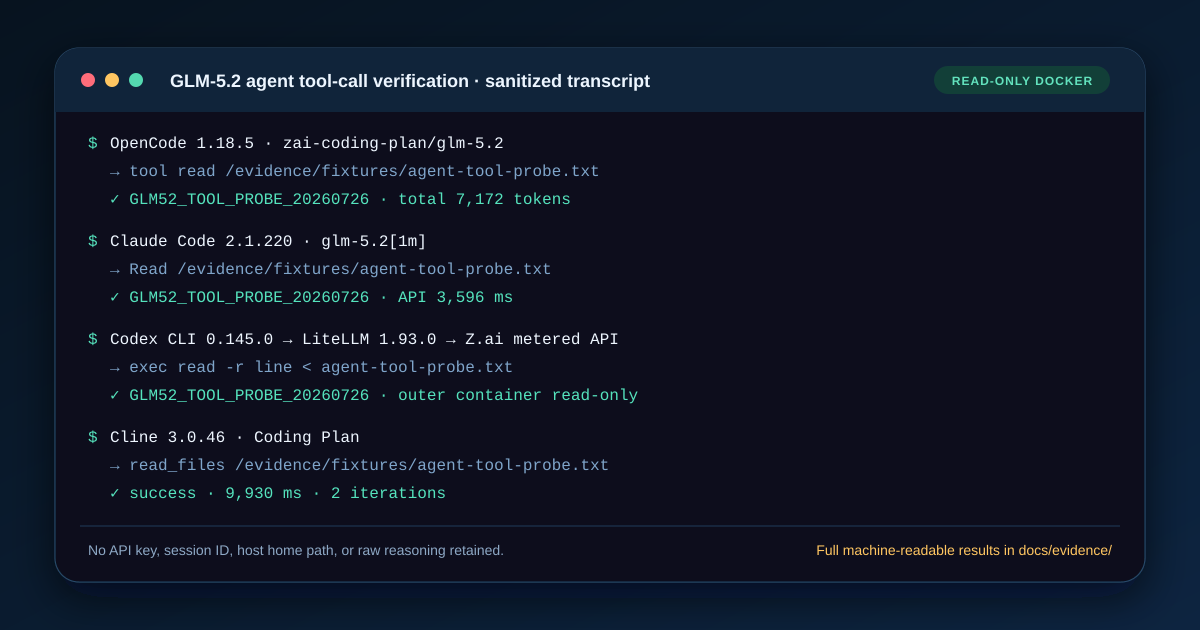
Codex CLI 0.145.0 can run GLM-5.2 through Z.ai’s pay-as-you-go API when a local LiteLLM bridge converts Codex Responses requests to Chat Completions. Our exact-response probe returned CODEX_PAYGO_OK in 4.958 seconds, and a subsequent exec tool read the fresh sentinel. A direct Z.ai config did not run because this Codex version rejects wire_api = "chat".
The Coding Plan scenario has a second, independent stop condition: as checked on July 26, 2026, Z.ai’s supported-tool list does not include Codex CLI. A technically imaginable proxy is not permission to spend a subscription through an unlisted client. This page therefore gives a tested metered setup and an explicit Coding Plan non-setup.
In this guide
Section titled “In this guide”- See the two-route verdict
- Understand the Responses and Chat mismatch
- Configure the metered API bridge
- Run an exact response and tool test
- Handle Coding Plan without guessing
- Troubleshoot the bridge
- Read the security boundary
- Sources and test limits
See the two-route verdict
Section titled “See the two-route verdict”| Z.ai access product | Codex 0.145.0 result | Why | Safe next step |
|---|---|---|---|
| Coding Plan | Policy-blocked; no request sent | Codex is absent from the current supported-tool list; the native Chat wire is also rejected | Use an officially listed client such as OpenCode or wait for Z.ai to document Codex |
| Pay-as-you-go API, direct | Configuration rejected before request | Codex custom providers expect Responses; Z.ai’s route is Chat Completions | Do not retry keys or change the model name |
| Pay-as-you-go API, LiteLLM bridge | Pass | LiteLLM translated Responses to Chat Completions | Reproduce locally, then inspect dropped parameters before real work |
These outcomes cover both requested access scenarios without pretending symmetry. “Unsupported today” is useful setup information: it prevents accidental plan use and distinguishes a protocol mismatch from a bad key.
Understand the Responses and Chat mismatch
Section titled “Understand the Responses and Chat mismatch”Codex’s configuration reference exposes model_providers, base_url, env_key, and wire_api. In the tested build, setting wire_api = "chat" produced a client-side rejection because the legacy Chat wire is no longer accepted. The valid custom-provider setting is wire_api = "responses".
Z.ai’s HTTP introduction documents an OpenAI-compatible Chat Completions route under /api/paas/v4. “OpenAI-compatible” is therefore not specific enough: OpenAI has more than one API shape, and a client speaking Responses cannot automatically send that body to a Chat-only server.
This direct configuration is preserved as a negative diagnostic, not a recommendation:
model = "glm-5.2"model_provider = "zai_paygo_native_negative"
[model_providers.zai_paygo_native_negative]name = "Z.ai metered API — incompatible direct wire"base_url = "https://api.z.ai/api/paas/v4"env_key = "ZAI_API_KEY"wire_api = "chat"
If a future Codex version accepts Chat again or Z.ai adds Responses, retest the direct path before removing the bridge. Do not infer that change from a marketing phrase.
Configure the metered API bridge
Section titled “Configure the metered API bridge”The bridge has two secret-free files. LiteLLM receives the real Z.ai key; Codex receives only a local proxy key that you choose for the loopback service.
model_list:  - model_name: glm-5.2    litellm_params:      model: openai/chat_completions/glm-5.2      api_base: https://api.z.ai/api/paas/v4      api_key: os.environ/ZAI_API_KEY
litellm_settings: drop_params: truemodel = "glm-5.2"model_provider = "litellm_zai"model_context_window = 1048576model_auto_compact_token_limit = 900000
[model_providers.litellm_zai]name = "Local LiteLLM bridge to Z.ai metered API"base_url = "http://127.0.0.1:40152/v1"env_key = "LITELLM_API_KEY"wire_api = "responses"requires_openai_auth = falserequest_max_retries = 0stream_max_retries = 0Start LiteLLM only on loopback. Keep both keys outside the files:
export ZAI_API_KEY="your-zai-metered-key"export LITELLM_API_KEY="choose-a-local-proxy-key"
litellm \  --config "$PWD/litellm-zai.yaml" \  --host 127.0.0.1 \  --port 40152
In another terminal with LITELLM_API_KEY available, point Codex at the separate config. Codex’s exact flag surface can change, so confirm it with codex --help and codex exec --help for your installed version.
codex --config "$PWD/codex-zai.toml" exec \ "Reply with exactly: CODEX_PAYGO_OK"Do not expose the proxy on 0.0.0.0, forward it through a public tunnel, or reuse a weak local key on a shared host. The bridge sees prompts, tool schemas, responses, and the upstream credential.
Run an exact response and tool test
Section titled “Run an exact response and tool test”Our sanitized July 26 run recorded:
| Check | Observed result |
|---|---|
| Codex CLI | 0.145.0 |
| LiteLLM | 1.93.0 |
| Upstream route | Z.ai global pay-as-you-go API |
| Exact response | CODEX_PAYGO_OK |
| Wall time | 4,958 ms |
| Reported input / output | 6,640 / 7 tokens |
| Tool probe | exec returned GLM52_TOOL_PROBE_20260726 |
| Important warning | LiteLLM dropped a Responses namespace tool with no Chat equivalent |
Use a new sentinel instead of copying ours:
printf 'CODEX_GLM52_%s\n' "$(date +%s)" > codex-glm52-check.txt
codex --config "$PWD/codex-zai.toml" exec \  "Use the shell tool to read codex-glm52-check.txt and return only its contents."
Require a visible tool event and an exact value. A correct plain response proves the bridge moved one message; it does not prove tools survived protocol translation. Delete the sentinel when finished.
Handle Coding Plan without guessing
Section titled “Handle Coding Plan without guessing”The hypothetical provider block would point at https://api.z.ai/api/coding/paas/v4, but it has two blockers in this test:
- Codex 0.145.0 rejects the
chatwire that the endpoint requires. - Z.ai’s Coding Plan quick start does not list Codex as a supported client.
For those reasons, we parsed and reviewed the config offline but did not submit a plan request. Do not hide a Coding Plan key behind LiteLLM merely because the metered bridge works. Protocol translation and commercial eligibility are separate questions.
If Z.ai later names Codex, require all of the following before calling the path supported:
- an official supported-tool entry or explicit provider statement;
- a documented protocol route that Codex or a sanctioned bridge can use;
- one exact response and one tool result on a plan account;
- an observed quota decrement in the intended product, not metered API spend.
Until then, use OpenCode, Claude Code, Cline, Kilo, Crush, or goose for the plan route. The 11-client setup matrix shows their dated results.
Troubleshoot the bridge
Section titled “Troubleshoot the bridge”Codex says the Chat wire is unsupported
Section titled “Codex says the Chat wire is unsupported”You loaded the direct negative config or an older example. Codex must speak responses to LiteLLM in this tested version. The bridge, not Codex, speaks Chat Completions upstream.
LiteLLM returns 401
Section titled “LiteLLM returns 401”Check ZAI_API_KEY in the bridge process without printing it, then confirm it is a pay-as-you-go API key for the global endpoint. LITELLM_API_KEY authenticates Codex to the local proxy; swapping the two keys causes a different failure.
The response works but a tool disappears
Section titled “The response works but a tool disappears”Inspect LiteLLM warnings. Our run explicitly reported that a Responses namespace tool had no Chat equivalent and was dropped. Test every tool type your workflow depends on; do not infer MCP or namespace-tool compatibility from the successful shell probe.
Context compacts or fails early
Section titled “Context compacts or fails early”model_context_window = 1048576 describes the intended model budget, not measured permission on every account and intermediary. Codex instructions, tool schemas, history, results, and output allowance all consume it. Reduce the task and log the actual upstream error before changing the number.
A nested Docker run cannot start its sandbox
Section titled “A nested Docker run cannot start its sandbox”Nested bubblewrap may be unable to create an unprivileged user namespace. Keep an outer container as the security boundary or adjust the container runtime deliberately. Never solve this on a native host by casually disabling the Codex sandbox.
Read the security boundary
Section titled “Read the security boundary”The tool probe used --sandbox danger-full-access inside an already isolated, read-only, non-root Docker container because nested bubblewrap failed. The outer container had no writable host mount, no Docker socket, and no privileged mode. That inner flag is unsafe as a generic host-native instruction and is intentionally absent from the copyable command above.
A production bridge also expands the trusted computing base. Pin LiteLLM, bind only to loopback, review its logs and retention settings, set upstream timeouts, and decide which unsupported Responses fields should fail instead of being silently dropped. drop_params: true made this bounded compatibility test work; it may be too permissive for a workflow that depends on an exact tool or reasoning field.
Sources and test limits
Section titled “Sources and test limits”Sources checked July 26, 2026:
- Codex configuration reference — custom provider fields and Responses wire configuration;
- Codex Chat-wire removal discussion — upstream compatibility context;
- Z.ai Coding Plan quick start — supported-tool list and plan boundary;
- Z.ai HTTP introduction — general OpenAI-compatible API route;
- LiteLLM Responses-to-Chat implementation — translation path used by the pinned bridge.
The live test proves one Codex 0.145.0 plus LiteLLM 1.93.0 path, one metered account, one exact response, and one shell tool call. It does not prove Coding Plan eligibility, lossless conversion of every Responses feature, stable latency, or host-native sandbox safety.