
GLM-5.2 with OpenCode: Setup, Config and Troubleshooting
Independent research — not an official Z.ai publication.Identity and provider disclosure

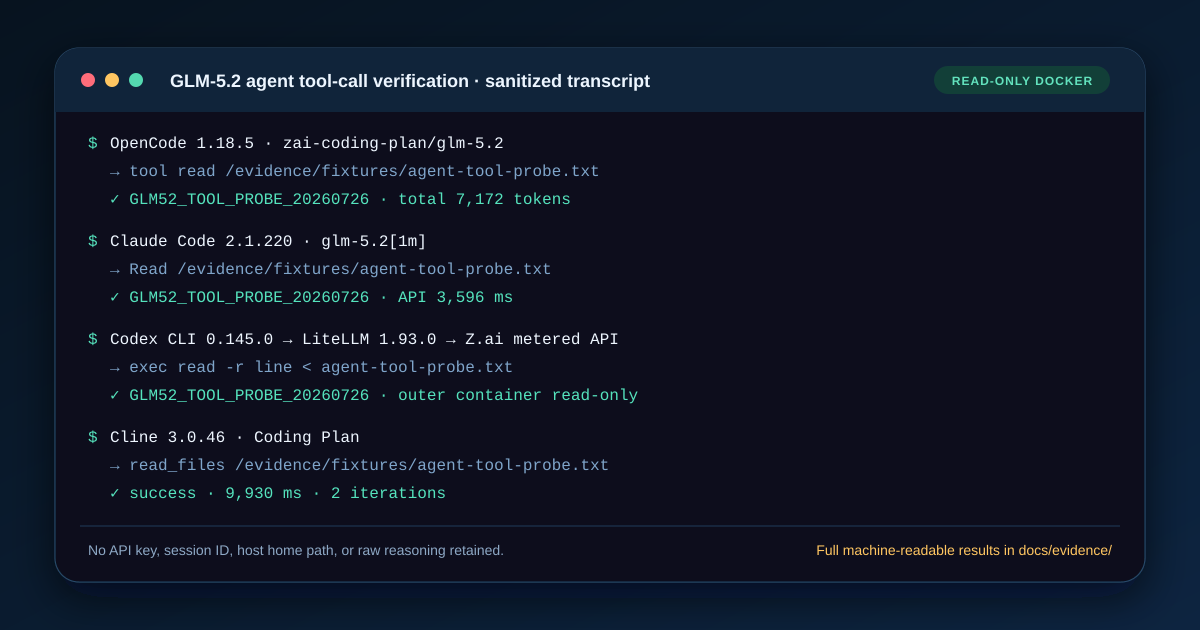
OpenCode 1.18.5 completed real GLM-5.2 requests through both Z.ai products in our July 26, 2026 Docker test. Coding Plan returned OC_PLAN_OK in 6.589 seconds; pay-as-you-go returned OC_PAYGO_OK in 6.339 seconds. A separate Coding Plan run used OpenCode’s read tool and returned the fresh sentinel from a file.
Seeing a model in /models still proves only that local configuration loaded. The guide below uses OpenCode’s current built-in provider IDs, gives one complete opencode.json for each billing route, and separates model selection, authentication, response evidence, and tool-call evidence.
In this guide
Section titled “In this guide”- The working configuration
- Set the Z.ai environment variable
- Coding Plan vs free vs pay-as-you-go
- Install and run OpenCode
- Confirm which config OpenCode loaded
- Verify a real request and tool call
- Read the request and response screenshot
- Fix 401 authentication errors
- Fix the wrong model name or endpoint
- Fix context-limit errors
- Fix tool-call failures
- Production checklist
- Sources and test limits
The working configuration
Section titled “The working configuration”Create opencode.json in the root of the project you want OpenCode to inspect. OpenCode 1.18.5’s current provider catalog already defines Z.ai, so this first file selects the built-in zai-coding-plan provider and overrides only the audited endpoint and credential source.
{ "$schema": "https://opencode.ai/config.json", "model": "zai-coding-plan/glm-5.2", "provider": { "zai-coding-plan": { "options": { "baseURL": "https://api.z.ai/api/coding/paas/v4", "apiKey": "{env:ZHIPU_API_KEY}" } } }}There are three identifiers here, and each has a different job:
zai-coding-planis OpenCode’s current built-in Coding Plan provider ID.glm-5.2is Z.ai’s documented API model ID.zai-coding-plan/glm-5.2is the full plan selector.
The live OpenCode provider catalog currently maps this provider to @ai-sdk/openai-compatible and reads ZHIPU_API_KEY. Older articles often define a custom zai provider with ZAI_API_KEY; that can collide with the newer built-in catalog and retain stale options after config merging.
The catalog supplies the model’s declared limits. It does not force Z.ai to accept a million-token request, enlarge a plan limit, or override account policy. Z.ai’s GLM-5.2 page publishes 1M context and 128K maximum output, while an intermediary or product tier can expose less.
Pay-as-you-go version
Section titled “Pay-as-you-go version”If you have a normal Z.ai API key and want per-token billing, use the separate built-in zai provider:
{ "$schema": "https://opencode.ai/config.json", "model": "zai/glm-5.2", "provider": { "zai": { "options": { "baseURL": "https://api.z.ai/api/paas/v4", "apiKey": "{env:ZHIPU_API_KEY}" } } }}Do not append /chat/completions to baseURL; the OpenAI-compatible client adds that request path. A doubled path is a common cause of 404 responses.
Set the Z.ai environment variable
Section titled “Set the Z.ai environment variable”Keep the key outside opencode.json. OpenCode supports {env:VARIABLE_NAME} substitution, and its current built-in Z.ai providers read ZHIPU_API_KEY. An unset variable becomes an empty string, which is why a missing export often appears as a provider-side 401 rather than a local config error.
macOS or Linux
Section titled “macOS or Linux”export ZHIPU_API_KEY="your-zai-key"test -n "$ZHIPU_API_KEY" && echo "ZHIPU_API_KEY is set"PowerShell
Section titled “PowerShell”$env:ZHIPU_API_KEY = "your-zai-key"if ($env:ZHIPU_API_KEY) { "ZHIPU_API_KEY is set" }The check prints only presence, never the secret. Do not use echo $ZHIPU_API_KEY, paste the key into an issue, put it in a screenshot, or commit a .env file. If you want persistence, store the export in your shell’s secret-loading mechanism and keep that file outside the repository.
You can alternatively run opencode auth login and select Z.AI Coding Plan or Z.AI, as the official integration guide describes. The explicit environment-variable config used here is easier to audit: the endpoint, model, and credential source are visible in one file while the secret remains outside it.
Coding Plan vs free vs pay-as-you-go
Section titled “Coding Plan vs free vs pay-as-you-go”“OpenCode is free” and “GLM-5.2 is free in OpenCode” are not the same claim. OpenCode is an open-source client, but a remote model still needs compute and an access arrangement.
| Route | What you receive | Endpoint for this guide | Billing boundary | Best fit |
|---|---|---|---|---|
| Free evaluation | A limited browser test or open-weight inspection; no durable GLM-5.2 OpenCode quota verified | Not the Z.ai OpenCode endpoint | No charge for the limited test; automation or hosting still costs | Judge output before connecting a coding agent |
| GLM Coding Plan | GLM-5.2 in supported coding tools, rolling five-hour and weekly quotas, plan MCP benefits | https://api.z.ai/api/coding/paas/v4 |
Subscription, starting at $18/month when checked; quota multipliers and promotions can apply | A developer using OpenCode interactively |
| Pay-as-you-go API | General-purpose GLM-5.2 calls charged by measured tokens | https://api.z.ai/api/paas/v4 |
$1.40/M input, $0.26/M cached input, $4.40/M output when checked | Software integrations, usage accounting, or irregular agent work |
The official OpenCode Zen catalog also includes opencode/glm-5.2, but Zen describes that route as pay-as-you-go. Its currently labelled free models are different model IDs. A temporary signup credit can reduce a first test’s cash cost, but it is not a permanent free tier.
For a no-account behavior check, the free GLM-5.2 guide covers Cloudflare’s browser playground and explains where free testing ends. For a wider delivery decision, compare Coding Plan, API, and self-hosting. If an application rather than a person will drive requests, use the GLM-5.2 API provider comparison.
Install and run OpenCode
Section titled “Install and run OpenCode”Z.ai and OpenCode both document npm installation. Check the version immediately so a later bug report includes a reproducible client build.
npm install --global opencode-aiopencode --versionThe evidence on this page pins 1.18.5. If the command prints another version, treat the examples as migration input and rerun both routes rather than assuming compatibility.
Run the project from the directory containing opencode.json:
cd /path/to/your/projectopencodeUse /models and select zai-coding-plan/glm-5.2 for the plan file or zai/glm-5.2 for the metered file. Seeing the selector confirms that OpenCode merged the provider and model definitions. It does not yet validate authentication.
For a deterministic one-shot check, avoid relying on the last model selected in another project:
opencode run --model zai-coding-plan/glm-5.2 \  "Reply with exactly: OC_PLAN_OK"
opencode run --model zai/glm-5.2 \  "Reply with exactly: OC_PAYGO_OK"
If you keep a separate config file, OpenCode supports OPENCODE_CONFIG:
OPENCODE_CONFIG="$PWD/opencode.json" \ opencode run "Reply with exactly: config loaded"OpenCode merges config sources. A project-level opencode.json has higher precedence than OPENCODE_CONFIG, so inspect both if the effective endpoint differs from what you expect.
Confirm which config OpenCode loaded
Section titled “Confirm which config OpenCode loaded”OpenCode merges remote, global, custom-path, project, .opencode, and inline configuration instead of replacing the earlier file wholesale. That makes shared defaults convenient, but it also creates a specific failure mode: the JSON you just edited may not be the value that wins.
Use a temporary, empty directory when you want a clean diagnostic:
mkdir opencode-glm52-checkcp opencode.json opencode-glm52-check/opencode.jsoncd opencode-glm52-checkopencode run "Reply with exactly: config loaded"Do not copy private project files into the diagnostic directory. This test removes a higher-precedence project config from the equation while preserving the exact provider block you intend to ship.
Then classify what happens:
| Observation | What it proves | What it does not prove |
|---|---|---|
The intended …/glm-5.2 appears in /models |
Provider and model JSON parsed | Key, endpoint, quota, or tool calls work |
| One-line response succeeds | Authentication, model routing, and response parsing worked once | File tools or long sessions work |
| Sentinel read succeeds | A built-in tool request and result round trip worked | MCP, write permissions, or production reliability work |
| The same prompt fails only in the real repository | Project config, instructions, permissions, context, or plugins differ | The provider is globally down |
Do not paste an older custom zai provider definition on top of the current built-in provider unless you have inspected the merged result. The 1.18.5 catalog already owns zai and zai-coding-plan. During diagnosis, use an empty directory and the minimal files above so global or project options cannot silently replace the endpoint.
Also test with plugins out of the path when a minimal run hangs or produces unrelated errors:
opencode run --pure "Reply with exactly: pure run works"--pure is a diagnostic boundary, not a permanent recommendation. If it fixes the run, re-enable plugins one at a time and inspect their configuration, network calls, and permissions.
Verify a real request and tool call
Section titled “Verify a real request and tool call”A response-only prompt proves the transport path. A read-only tool check adds evidence that GLM-5.2 emitted a tool call OpenCode could execute and that the result reached the model.
Create a harmless sentinel file:
printf 'OPENCODE_GLM52_%s\n' "$(date +%s)" > opencode-check.txtThen ask OpenCode to read it:
opencode run --model zai-coding-plan/glm-5.2 \ "Use the read tool to read opencode-check.txt. Reply with only the token in that file."A valid pass has four observable parts:
- OpenCode identifies
zai-coding-plan/glm-5.2as the active model. - The request reaches the intended Z.ai product endpoint without 401, 404, or quota errors.
- OpenCode records a read operation for
opencode-check.txt. - The final answer exactly matches the newly generated token, and the command exits successfully.
Do not accept an invented token. Change the sentinel on every independent test so the model cannot guess it from this article. Remove the file afterward if you do not want it in the project.
For automated checks, add --format json and inspect the events, not only the process status. A robust smoke test fails if any error event appears, requires a read-tool event, and compares the final text with the fresh sentinel. Treating exit code zero as success would reproduce the exact “config saved, therefore it works” mistake this guide is designed to prevent.
The pinned Docker run produced this evidence:
| OpenCode 1.18.5 check | Result |
|---|---|
| Coding Plan exact response | OC_PLAN_OK, 6,589 ms |
| Pay-as-you-go exact response | OC_PAYGO_OK, 6,339 ms |
| Coding Plan read tool | GLM52_TOOL_PROBE_20260726 returned, 7,172 tokens on the last turn |
| Metered usage report | 263 input, 6 output, 17 reasoning, and 6,784 cache-read tokens; reported cost $0.00223324 |
Read the request and response screenshot
Section titled “Read the request and response screenshot”The screenshot at the top is a sanitized summary derived from the archived Docker results—not a screenshot of a configuration file. It preserves the pinned version, two endpoint classes, exact responses, and representative read-tool result while excluding the API key and host paths.
That distinction matters. A screenshot of opencode.json proves only that a file was edited. A screenshot of /models proves only that a provider definition loaded. The request-and-response capture proves that the tested endpoint/key pair accepted glm-5.2 and completed this bounded tool workflow at the recorded time.
It remains a set of bounded smoke tests, not a reliability benchmark. It does not measure long-context behavior, multi-hour agent stability, concurrency, or latency distribution. Each route used its intended product credential; success does not mean the same key is interchangeable.
Fix 401 authentication errors
Section titled “Fix 401 authentication errors”A 401 means the server did not accept the presented credential. Work through the causes in this order:
1. Confirm the variable exists in the same shell
Section titled “1. Confirm the variable exists in the same shell”test -n "$ZHIPU_API_KEY" && echo set || echo missingStarting OpenCode from another terminal, desktop launcher, IDE, container, or SSH session can create a different environment. Because a missing {env:ZHIPU_API_KEY} becomes an empty string, confirm presence before changing model settings.
2. Match the key to the endpoint
Section titled “2. Match the key to the endpoint”- Coding Plan key →
https://api.z.ai/api/coding/paas/v4 - General pay-as-you-go key →
https://api.z.ai/api/paas/v4
Z.ai documents the plan as a separate product with a dedicated URL. Do not assume a Coding Plan subscription creates general API credit, or that a general key spends the plan’s quota.
3. Check region and account
Section titled “3. Check region and account”This page uses Z.ai’s global endpoints. Mainland China accounts use open.bigmodel.cn endpoints and may have a different key family. Copy the current base URL from the console that issued your key; do not mix account regions by analogy.
4. Rotate a leaked or stale key
Section titled “4. Rotate a leaked or stale key”If the key appeared in shell history, source control, an image, or a support ticket, revoke it in the Z.ai console and create a new one. Retrying a compromised credential is not troubleshooting.
Fix the wrong model name or endpoint
Section titled “Fix the wrong model name or endpoint”Three similar strings cause different failures:
| String | Correct use | Typical error when wrong |
|---|---|---|
glm-5.2 |
Z.ai request model ID | Model-not-found or access error |
zai-coding-plan/glm-5.2 |
OpenCode Coding Plan selector | Wrong product or “model not found” |
zai/glm-5.2 |
OpenCode metered API selector | Request sent to the wrong billing route |
https://api.z.ai/api/.../v4 |
options.baseURL |
404, 401, or request sent to the wrong billing product |
Avoid guessed names such as glm52, glm-5.2-latest, or zai-org/glm-5.2 for this endpoint. The last form belongs to other provider catalogs, not Z.ai’s direct API.
If the request URL ends in /chat/completions/chat/completions, remove the final path from baseURL. If it ends in /responses, inspect whether an old custom provider overrode the built-in @ai-sdk/openai-compatible catalog entry; Z.ai’s documented route here is Chat Completions.
Fix context-limit errors
Section titled “Fix context-limit errors”GLM-5.2’s published 1M context is a model capability, not permission to send an unbounded repository in one turn. OpenCode adds system instructions, tool definitions, message history, file content, and tool results to the request. Output allowance also consumes the provider’s request budget.
When a long session fails:
- Start a new session and reproduce with one small file.
- Reduce attached files, generated logs, and large tool outputs.
- Ask for a repository map first, then open only relevant modules.
- Keep the config
limit.contextat the actual endpoint limit, not a marketing maximum copied from another provider. - Check whether your intermediary or plan exposes less than the model’s architectural maximum.
- Capture the server’s exact error before changing the JSON.
If you need to understand price effects of repeated repository context, read the GLM-5.2 prompt-caching guide. Context caching can reduce eligible repeated-input cost; it does not increase the context window.
Fix tool-call failures
Section titled “Fix tool-call failures”Tool failures occur in at least three layers. Identify the layer before blaming the model.
The model never requests a tool
Section titled “The model never requests a tool”Make the action and output contract explicit: “Use the read tool to read opencode-check.txt; return only its contents.” Confirm that the selected model uses the intended zai-coding-plan or zai prefix, not a stale fallback. Start with a built-in, read-only tool before adding MCP servers.
OpenCode rejects or pauses the tool
Section titled “OpenCode rejects or pauses the tool”Review project and global permissions. An interactive ask rule cannot be answered in every unattended opencode run context. Grant only the minimum operation needed for the test; do not use a blanket dangerous skip as a permanent fix.
The provider response cannot be parsed
Section titled “The provider response cannot be parsed”Inspect the effective built-in provider and upgrade a very old OpenCode release, then rerun a one-tool prompt. If it still fails, capture sanitized debug output:
opencode --print-logs --log-level DEBUG run \ "Use the read tool to read opencode-check.txt and return its contents."Inspect the log locally before sharing it. Remove authorization headers, cookies, full local paths, repository secrets, request bodies containing private code, account IDs, and session share URLs.
MCP works badly while built-in read works
Section titled “MCP works badly while built-in read works”That result narrows the failure to the MCP definition, transport, authentication, permission rule, or tool schema. Test one MCP server and one method at a time. The Coding Plan’s optional MCP benefits do not automatically configure every local MCP server in OpenCode.
Production checklist
Section titled “Production checklist”-
opencode --versionis recorded with the test. -
ZHIPU_API_KEYis present but never printed or committed. - The key family matches Coding Plan or pay-as-you-go endpoint.
- The model is
zai-coding-plan/glm-5.2orzai/glm-5.2for the intended product. - The current catalog still maps the provider to
@ai-sdk/openai-compatible. - A small direct response succeeds before a repository-wide task.
- A changed sentinel is read through a built-in tool and returned correctly.
- Tool permissions follow least privilege.
- Context limits reflect the actual serving route.
- Debug evidence is sanitized before it leaves the machine.
Sources and test limits
Section titled “Sources and test limits”Primary documentation and the live provider catalog checked July 26, 2026:
- Z.ai OpenCode integration guide — supported provider choices and credential flow;
- Z.ai Coding Plan quick start — supported-tool boundary and dedicated endpoint;
- Z.ai Coding Plan overview — plan scope, starting price, quota windows, and supported models;
- Z.ai GLM-5.2 guide — model ID, context, output, function calling, and general request path;
- Z.ai model pricing — pay-as-you-go token rates;
- OpenCode provider documentation — custom provider package, base URL, API key, and model map;
- OpenCode config documentation — config precedence and environment-variable substitution;
- OpenCode provider catalog — current
zai-coding-plan/zaiidentifiers andZHIPU_API_KEYmapping; - OpenCode Zen documentation — separate Zen model IDs, pay-as-you-go behavior, and current free-model labels.
The recorded smoke tests validate OpenCode 1.18.5, both endpoint classes with their intended credentials, two exact responses, one small read tool call, and one point in time. They do not prove every account, region, plan tier, OpenCode release, MCP server, or million-token workload will behave identically. Re-run both route probes after changing any of those variables.