
GLM-5.2 AI Agent Setup: 11 CLI Tools Tested
Independent research — not an official Z.ai publication.Identity and provider disclosure

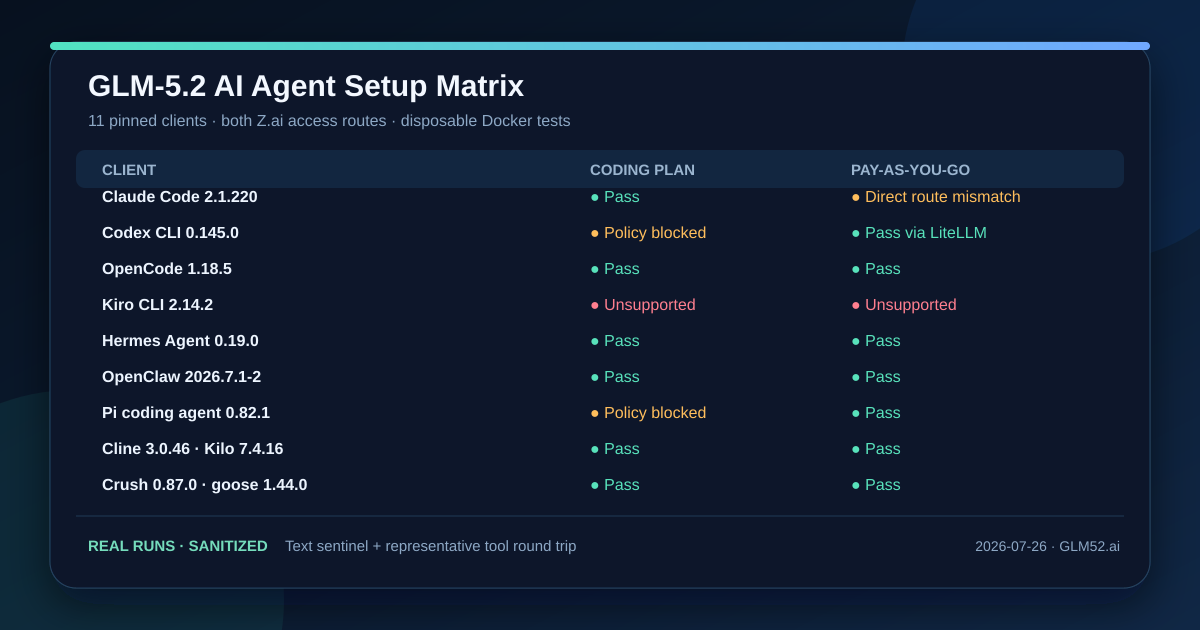
The shortest beginner answer is to start with OpenCode, Cline, Kilo, Crush, or goose: all five completed GLM-5.2 requests on both Coding Plan and pay-as-you-go routes in our pinned Docker tests. Claude Code worked on Coding Plan but could not speak directly to the global metered endpoint. Codex needed a LiteLLM protocol bridge for metered access. Pi worked on the metered API but is not currently on Z.ai’s Coding Plan supported-tool list. Kiro exposed no arbitrary provider endpoint at all.
This hub records what was actually tested on July 26, 2026, links to copyable configuration for every client, and preserves negative results instead of turning plausible JSON into a success claim. AI agent clients change quickly: use the listed version as a reproducibility boundary, then rerun the sentinel and tool test on your installed version.
In this guide
Section titled “In this guide”- Choose a client from the result matrix
- Understand the two Z.ai access routes
- Read the Docker test evidence
- Open the copyable setup for each agent
- Verify more than a saved config
- Protect keys and host systems
- Sources and update policy
Choose a client from the result matrix
Section titled “Choose a client from the result matrix”“Pass” means the pinned client returned an exact fresh response through the named route. A tool pass adds one harmless file-read round trip. It does not promise future eligibility, quota, every extension, or production reliability.
| Client tested | Pinned version | Coding Plan | Pay-as-you-go API | Representative tool result |
|---|---|---|---|---|
| OpenCode | 1.18.5 | Pass, 6.589 s | Pass, 6.339 s | read returned the fresh sentinel |
| Claude Code CLI | 2.1.220 | Pass, 2.648 s | Direct route incompatible, HTTP 404 | Read passed on Coding Plan |
| Codex CLI | 0.145.0 | Policy-blocked; native Chat wire rejected | Pass via LiteLLM 1.93.0, 4.958 s | exec passed inside the outer container |
| Pi coding agent | 0.82.1 | Policy-blocked; config parsed offline | Pass, 2.507 s | read passed on metered API |
| OpenClaw | 2026.7.1-2 | Pass, 11.707 s | Pass, 10.179 s | read passed; large default prompt |
| Kilo CLI | 7.4.16 | Pass, 13.131 s | Pass, 12.485 s | read returned the sentinel |
| Cline CLI | 3.0.46 | Pass, 7.585 s | Pass, 6.328 s | read_files returned the sentinel |
| Crush | 0.87.0 | Pass, 4.999 s | Pass, 3.572 s | file read passed |
| goose | 1.44.0 | Pass, 3.282 s | Pass, 2.031 s | shell read passed after one tool-choice failure |
| Hermes Agent | 0.19.0 / 2026.7.20 | Pass, 14.701 s | Pass, 13.226 s | terminal read passed |
| Kiro CLI | 2.14.2 | Unsupported | Unsupported | No provider endpoint field; no API call made |
These elapsed times are single smoke-test observations, not a latency leaderboard. The prompts, default tool schemas, cache state, and client startup cost differ. OpenClaw, for example, sent a much larger default prompt than goose, so comparing their wall times as model speed would be misleading.
Understand the two Z.ai access routes
Section titled “Understand the two Z.ai access routes”The same glm-5.2 label sits behind different commercial and protocol boundaries:
| Route | Base URL used in this test | Credential variable in examples | Billing shape | Suitable work |
|---|---|---|---|---|
| Coding Plan, OpenAI-compatible | https://api.z.ai/api/coding/paas/v4 |
ZAI_API_KEY or client-specific ZHIPU_API_KEY |
Subscription quotas and supported-tool policy | Interactive use in an eligible coding agent |
| Coding Plan, Anthropic-compatible | https://api.z.ai/api/anthropic |
ANTHROPIC_AUTH_TOKEN or mapped ZAI_API_KEY |
Same plan boundary | Claude Code; also the tested goose plan provider |
| Pay-as-you-go API | https://api.z.ai/api/paas/v4 |
ZAI_API_KEY |
Metered input, cached input, and output tokens | Applications, irregular agent use, and auditable usage |
Z.ai’s Coding Plan quick start and other-tools page define the supported-client boundary. Its API quick start documents the general OpenAI-compatible API. Do not assume that a general API key spends a Coding Plan allowance or that a subscription token carries metered credit.
A locally supported custom provider only proves technical expressiveness. We did not send Coding Plan traffic from Codex or Pi because the current supported-tool list does not name them. That distinction protects the user from a configuration that might parse but violate the product’s intended access policy.
Read the Docker test evidence
Section titled “Read the Docker test evidence”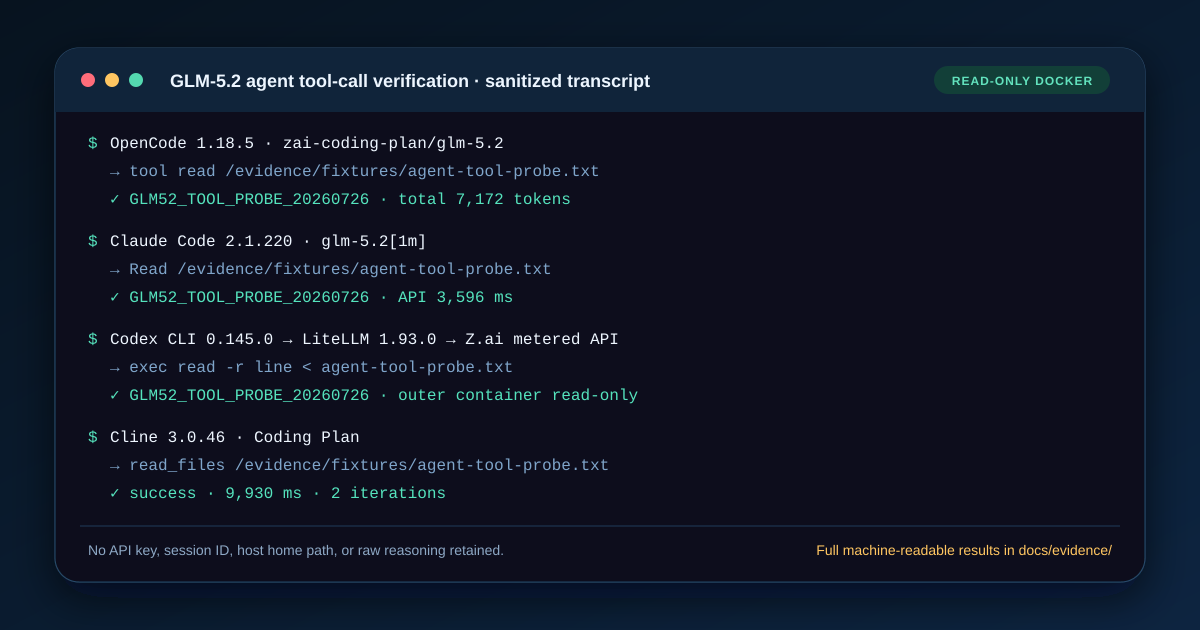
Each client ran as a non-root user in a disposable Docker container with a read-only root filesystem. Writable state was limited to temporary in-container filesystems. The host Docker socket was not mounted, the containers were not privileged, and no host path was writable. Credentials entered the ephemeral process through standard input and were excluded from configs, image layers, logs, screenshots, and Docker metadata.
The test sequence was deliberately small:
- identify the exact client version;
- load a secret-free provider config;
- request an unpredictable route-specific response such as
OC_PLAN_OK; - require a built-in tool to read a fresh file containing
GLM52_TOOL_PROBE_20260726; - verify the tool event, exact returned value, and error stream;
- remove the task containers, images, and network while preserving the sanitized evidence.
The host’s fake-IP routing prevented Docker bridge networking from reaching the API. The recorded minimum exception was --network host; the remaining isolation controls stayed in place. This is an environment-specific note, not a recommendation to default every test to host networking.
Open the copyable setup for each agent
Section titled “Open the copyable setup for each agent”The deep pages are separated by reader task so that one enormous page does not hide client-specific failure boundaries:
- OpenCode with GLM-5.2 contains two complete
opencode.jsonfiles, theZHIPU_API_KEYmapping, current provider IDs, and real request/read results. - Claude Code with GLM-5.2 contains the working Coding Plan settings and the failed direct metered route, including the protocol reason.
- Codex CLI with GLM-5.2 shows the tested LiteLLM Responses-to-Chat bridge and explains why neither direct route should be presented as native support.
- Cline, Kilo, Crush, and goose setup gives both access configurations and exact results for four terminal coding clients.
- OpenClaw, Hermes, Pi, and Kiro setup covers both routes for four broader agent runtimes, including Pi’s plan policy boundary and Kiro’s unsupported provider schema.
- DeepSeek Harness with GLM-5.2 audits the new
dshrc.6 provider path, including its exact request body, two pre-network failure controls, and an unresolved token-field mismatch; it is not counted as a live pass in this dated 11-client matrix.
If you only need to choose a commercial delivery route, use the separate Coding Plan vs API vs self-hosting guide. This page answers compatibility; it does not duplicate the cost and infrastructure decision.
Verify more than a saved config
Section titled “Verify more than a saved config”Use three gates in this order:
Gate 1: provider state
Section titled “Gate 1: provider state”Record the client version, selected provider, model ID, endpoint class, and config source. Never print the key. A model appearing in a picker proves only that local configuration parsed.
Gate 2: exact response
Section titled “Gate 2: exact response”Ask for a changed, exact token. Reject extra prose, an error event hidden behind exit code zero, or a fallback model. This proves one transport and parsing path at one time.
Gate 3: harmless tool round trip
Section titled “Gate 3: harmless tool round trip”Create a disposable sentinel file and explicitly ask the agent to read it with its native read or shell tool. Verify both the tool event and final token. Only after this succeeds should you test edits, shell execution, MCP servers, repositories, or unattended autonomy.
Changing the sentinel matters: a model can copy a published token without using a tool. A successful read still does not prove write permissions, long-context recall, every tool schema, or a production service-level objective.
Protect keys and host systems
Section titled “Protect keys and host systems”- Keep API keys in a shell secret loader or credential manager, never in committed JSON, TOML, YAML, screenshots, or prompts.
- Run unfamiliar clients and install scripts in a pinned disposable container. Mount only the fixture needed for the test, read-only.
- Treat an agent’s shell access as code execution. Start with read-only tools and a narrow working directory.
- Do not copy the Codex test’s inner
--sandbox danger-full-accessflag onto a native host. It was used only because an outer read-only Docker container already formed the security boundary and nested bubblewrap could not start. - Recheck versions and provider documentation before copying any configuration from this dated page.
Sources and update policy
Section titled “Sources and update policy”Primary and project documentation checked July 26, 2026:
- Z.ai Coding Plan quick start — current supported clients and dedicated plan route;
- Z.ai configuration for other tools — provider patterns and compatibility boundary;
- Z.ai OpenCode guide and Claude Code guide — first-party client integrations;
- Z.ai API quick start and HTTP introduction — general metered API protocol;
- the official documentation or release metadata for OpenCode, Claude Code, Codex CLI, Cline, Kilo, Crush, goose, OpenClaw, Hermes Agent, Pi, and Kiro.
This matrix is a dated compatibility snapshot. A future update must preserve the old client version and result, add the new version, rerun both access routes, and disclose any changed tool behavior. A configuration-only edit cannot overwrite a negative test.